The 10 Best E-commerce Platforms of 2026: Choose the Best Ecommerce Platform for Your Online Store
Picking the wrong e-commerce platform costs you more than time. It costs you money, customers, and growth.
A poorly chosen ecommerce setup typically costs $50,000 to $500,000 or more in migration, development, and downtime, according to industry estimates on enterprise replatforming projects. That number climbs fast for enterprise operations.
The decision you make today will define how your store performs tomorrow.
At Webo 360 Solutions, we have built, migrated, and scaled ecommerce stores across every major platform for clients in the USA and globally. Our team of ecommerce engineers does not sell you on one solution. We map the right e-commerce platform for your business model, catalog size, growth targets, and budget. This guide reflects that exact methodology.
We break down the 10 best ecommerce solutions of 2026 with hard data, real pricing, and direct guidance on who each online store actually serves. Beginner or enterprise, choosing the right ecommerce platform starts here. Choosing the top-rated ecommerce platform starts here.
Key Takeaways
A poor marketplace decision rarely shows up as one bad day. It shows up as months of lost revenue, a forced rebuild, and a replatforming bill that can run from $50,000 to $500,000 or more. Choose carefully up front.
Shopify wins on simplicity. WooCommerce wins on SEO. BigCommerce wins at volume. Adobe Commerce dominates enterprise deployments. Match the platform to your business, not the hype.
Apps, hosting, developers, and migration costs add up quickly. Always evaluate the total cost of ownership over three years.
SaaS platforms handle SSL and PCI DSS compliance automatically. A self-hosted store puts that responsibility on you. Know which model fits your business before you build.
The right platform, built incorrectly, still fails. Good engineering during setup, migration, and architecture prevents expensive rebuilds later.
📑 Table of Contents
How We Evaluated the Best Ecommerce Platforms
Not every ecommerce platform is built for the same business model. A startup launching its first online store has very different requirements than an enterprise brand managing hundreds of thousands of SKUs across multiple countries.
To create this guide, our ecommerce engineers at Webo 360 Solutions evaluated each platform using the criteria that matter most in real-world deployments:
Our rankings are based on hands-on implementation experience, platform architecture analysis, pricing data, and long-term operational considerations rather than vendor sponsorships or affiliate commissions.
Quick Comparison: Best E-commerce Platforms of 2026 at a Glance
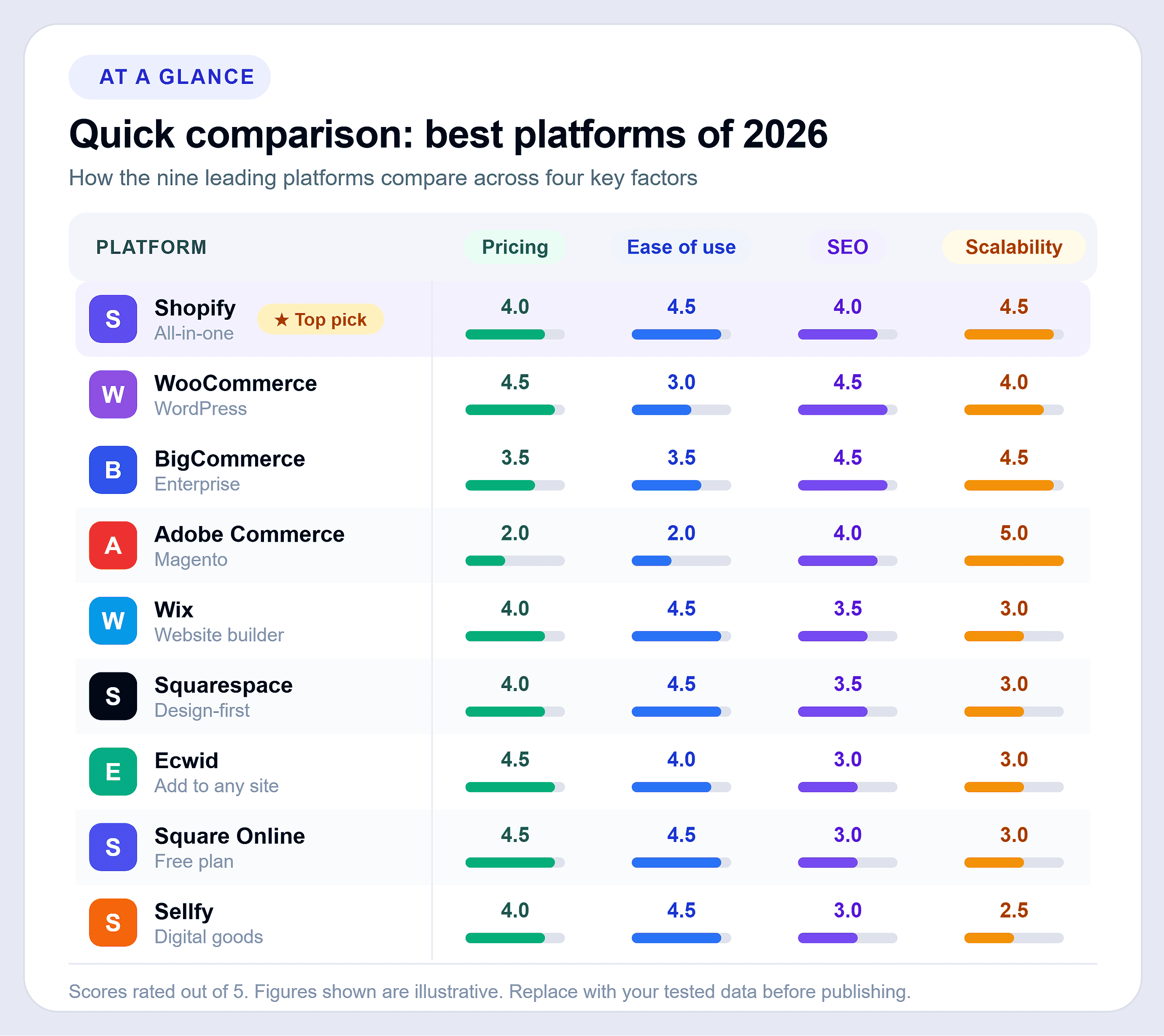
Here is a structured snapshot of the platforms covered in this guide. Use this table to compare your options side by side before reading the full breakdowns.
The best ecommerce platform ultimately depends on your business model, technical requirements, growth plans, and budget. Shopify remains the strongest all-around hosted ecommerce platform for most businesses; WooCommerce excels at SEO and customization, BigCommerce is ideal for B2B operations, and Adobe Commerce is built for enterprise-level scalability.
Businesses comparing ecommerce software platforms should evaluate not only monthly pricing but also long-term scalability, integrations, SEO capabilities, and total cost of ownership.
Best Ecommerce Platforms by Business Type
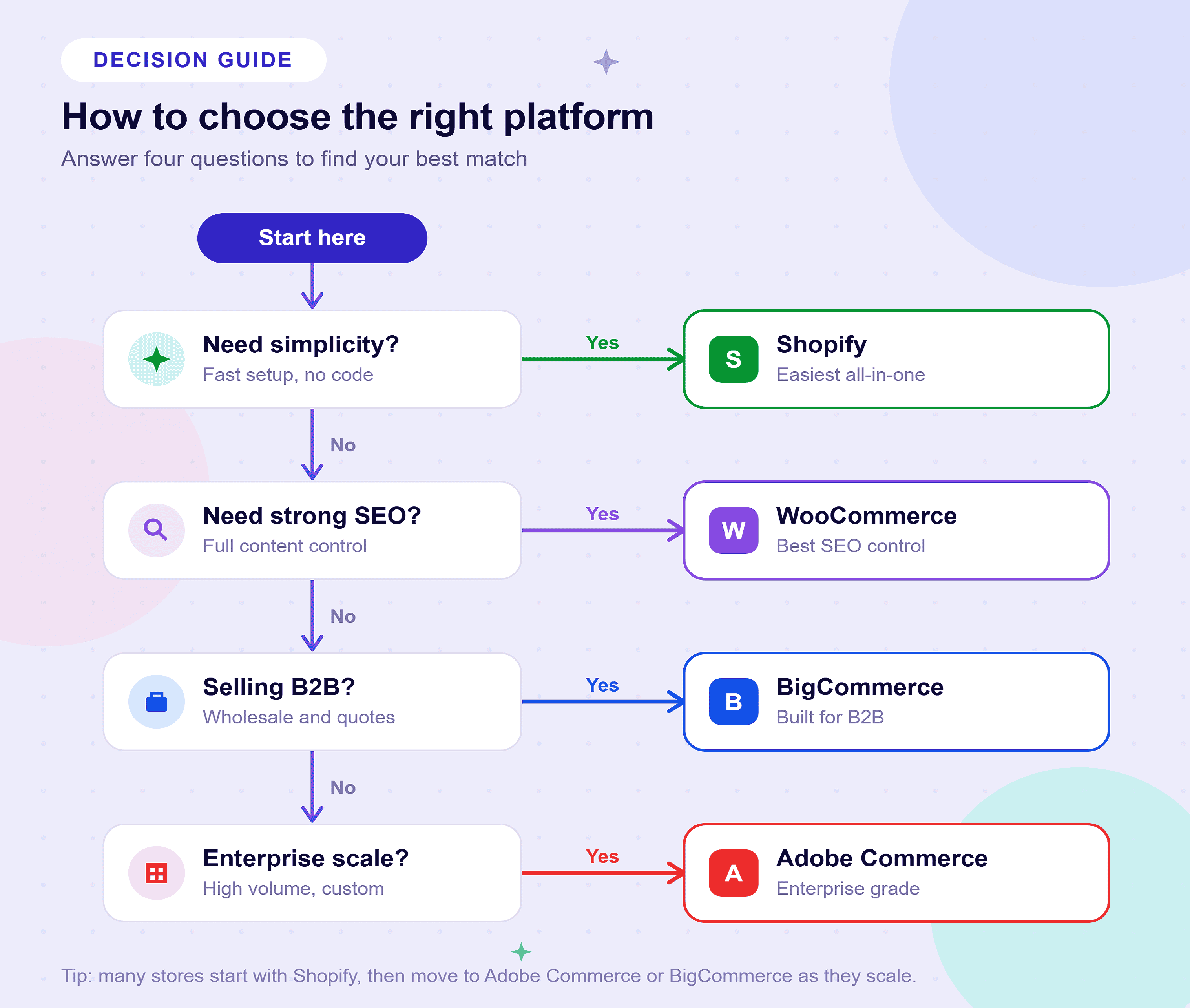
Not every ecommerce platform is designed for the same type of business. A startup launching its first online store has different requirements than an enterprise company, a B2B wholesaler, or a creator selling digital products.
To help you make a faster and more informed decision, we’ve matched each platform to the business type where it delivers the strongest results based on ease of use, SEO capabilities, scalability, integrations, and overall value. Use the table below to identify which ecommerce platform is likely the best fit for your business before exploring the detailed platform reviews.
Shopify: The Leading SaaS Ecommerce Platform for Growth-Focused Brands
Why Shopify Dominates as a Hosted Ecommerce Platform
Shopify’s global ecommerce online store market share is estimated between 10% and 26%, depending on the data provider and methodology (BuiltWith, Statista, and StoreLeads all report different figures). In the US specifically, most trackers place Shopify between 26% and 30% of the online marketplace market, making it the dominant domestic player. Shopify reports more than 4.8 million active stores worldwide. Those numbers do not happen by accident.
As a fully hosted SaaS online marketplace, Shopify eliminates every technical barrier between you and selling. Your server, security patches, PCI compliance, SSL, and infrastructure scaling are handled automatically. You focus on products and customers. Shopify handles the rest.
Shopify works for beginner store owners launching their first product. It also works for enterprise brands managing hundreds of thousands of SKUs. Ease of use is built into every layer of the admin, from product setup to checkout configuration. It remains one of the most reliable online store marketplaces available today.
Key Features: UX, CRO, and Selling Power
Shopify’s user experience design is deliberate. Every default theme, checkout flow, and admin interface is built to drive conversions, not just look good.
Shopify built its checkout to maximize conversion, and Shop Pay sits at the center of that design. The webstore publicly cites measurable conversion lift from accelerated checkout, with one-page checkout, Shop Pay, Apple Pay, and Google Pay reducing friction at every step.
Key features that matter operationally:
- 100+ payment gateways: Native support for Stripe, PayPal, Shopify Payments, and many other global providers.
- Custom URLs: Full control over URL structures and metadata, making Shopify a strong platform for SEO.
- Headless commerce: Shopify’s Storefront API enables complete front-end flexibility for custom experiences.
- Multi-channel selling: Manage sales across Amazon, eBay, Instagram, TikTok, and Walmart from a single dashboard.
- Shopify Markets: Expand internationally with localized currencies, languages, and tax management.
- 2,000+ app integrations: One of the most extensive ecosystems of ecommerce tools and third-party services.
- Built-in analytics: Native reporting combined with GA4 integration provides visibility into sales and customer behavior.
- Mobile-responsive themes: Optimized themes deliver strong performance and Core Web Vitals scores right out of the box.
Shopify Pricing and Total Cost of Ownership (TCO)
The advertised prices are only the starting point. Understanding your true TCO requires looking at the complete picture.
Official 2026 Pricing (billed monthly):
The transaction fee structure is critical to understand. Process $50,000 per month on the Basic plan using a third-party gateway like Stripe, and you pay Shopify an additional $1,000 per month on top of Stripe’s processing fees. Moving to Shopify Payments eliminates that cost.
Additional TCO factors to account for:
- Premium themes: One-time purchases typically range from $180 to $400, depending on design complexity and features.
- Apps: By year two, many Shopify merchants spend approximately $300–$500 per month on premium apps and integrations.
- Development costs: Custom theme design and development projects generally range from $3,000 to $25,000 based on complexity and requirements.
- Shopify Email: Includes up to 10,000 emails per month at no additional cost, with usage-based pricing beyond that limit.
A mid-market brand on the Advanced plan with five paid apps ($250/month), Shopify Payments, and a custom theme realistically spends $700 to $900/month in total online store costs. That is far from the $399 headline price.
Shopify: Pros and Cons
Pros:
- Fast time to launch: Stores can go live in days instead of months, making Shopify one of the quickest ecommerce platforms to deploy.
- Managed infrastructure: No server administration, hosting decisions, or maintenance overhead required.
- Built-in multi-channel selling: Sell across marketplaces and international regions using native cross-border tools.
- Shopify Payments integration: Simplifies payment reconciliation and avoids additional transaction fees.
- Enterprise capabilities: Shopify Plus provides headless commerce, Shopify Flow automation, and dedicated merchant support.
- High availability: Consistent 99.99% uptime backed by a global CDN.
- Conversion optimization: Built-in CRO features and accelerated checkout options help improve sales performance.
- User-friendly administration: One of the easiest ecommerce dashboards for non-technical store owners.
Cons:
- Limited blogging capabilities: Content marketing and SEO tools are less flexible than WordPress for content-heavy strategies.
- Third-party gateway fees: Transaction fees of up to 2% apply when not using Shopify Payments, reducing margins at scale.
- Growing app expenses: Monthly costs can increase quickly as stores rely on premium apps for advanced functionality.
- Customization limitations: Shopify’s Liquid framework offers less visual flexibility and a steeper learning curve than WordPress page builders.
- Shopify Plus pricing: Starting at approximately $2,300+ per month, enterprise plans may be cost-prohibitive for early-stage businesses.
WooCommerce: The Definitive Open-Source Ecommerce Platform for Complete Control
Why WooCommerce Stands Apart as the World’s Most-Used Ecommerce Solution
WooCommerce is the most widely used digital commerce platform on earth. Estimates of WooCommerce’s global market share vary widely by data source, ranging from roughly 20% to 39% of all webstores, depending on whether inactive installs are counted. StoreLeads places it at 33.4% with 4.53 million active stores; BuiltWith’s broader count, which includes inactive sites, puts total installs above 6 million. It runs as a free, open-source online marketplace plugin on WordPress, which, according to W3Techs, powers over 40% of all websites.
The market share alone tells a story. Businesses choose WooCommerce because it offers something no SaaS platform can match: complete ownership and zero platform dependency. You own your code, your data, and your store. There is no subscription lock-in, no transaction fees at the platform level, and no artificial ceiling on what you can build.
WooCommerce’s WordPress foundation gives it a structural SEO advantage that hosted platforms cannot replicate. It is also a leading open source option for developers who need full code-level access without licensing restrictions.
Core Flexibility: What WooCommerce Actually Enables
WooCommerce’s power comes from its architecture, not its out-of-the-box defaults. The plugin itself is deliberately minimal. What you build on top of it is entirely up to you.
WooCommerce runs on WordPress, which gives you access to the world’s largest CMS plugin library, with over 59,000 free plugins in the official repository alone. Every aspect of your store’s functionality is customizable at the code level. This makes it the premium ecommerce solution for teams that require total technical control.
Key capabilities that separate WooCommerce from hosted alternatives:
- Custom URLs and URL structures: Full control through WordPress permalink settings, making WooCommerce one of the strongest platforms for SEO-focused businesses.
- Headless commerce: The WooCommerce REST API supports decoupled front ends built with React, Next.js, or Vue.
- Unlimited product types: Sell physical products, digital downloads, subscriptions, memberships, bookings, and variable products from a single platform.
- Custom payment gateways: Integrate directly with virtually any payment processor without platform-imposed transaction fees.
- Advanced SEO control: Plugins like Yoast and Rank Math provide schema markup, XML sitemaps, and extensive technical SEO capabilities.
- Multi-vendor marketplace support: Build marketplaces using plugins such as Dokan or WC Vendors.
- Full database access: Enable custom reporting, migrations, and deep third-party integrations with complete ownership of your data.
- Staging environments: Support version-controlled deployments and testing workflows required by enterprise teams.
For businesses producing significant content alongside their products, the WordPress-WooCommerce combination is a strong choice. Few competing online store builders match WordPress’s native editorial and SEO toolset.
WooCommerce True Pricing and Hosting Costs
The plugin itself is free. What you pay for is hosting, premium extensions, and development work, and that range is wide.
Hosting cost range (2026):
Additional WooCommerce cost factors:
- WooCommerce Subscriptions: Approximately $279 per year for recurring billing and membership functionality.
- WooCommerce Bookings: Around $249 per year for appointment scheduling and reservation capabilities.
- Premium themes: Popular options such as Flatsome and Astra Pro typically cost between $59 and $249 as one-time purchases or annual licenses.
- Security plugins: Solutions like Wordfence and Sucuri generally range from $99 to $229 per year.
- Backup solutions: Reliable backup services typically cost between $60 and $200 annually.
- Developer maintenance: Active stores often require monthly retainers ranging from $300 to $2,000 for updates, monitoring, and ongoing support.
A professionally run WooCommerce store with managed hosting, three premium extensions, a security plugin, and light developer support realistically costs $400 to $800/month in year one. Shopify Advanced costs slightly more but includes hosting and security out of the box.
WooCommerce’s TCO scales more favorably at very high traffic volumes, since you pay for raw server resources rather than percentage-based platform fees.
WooCommerce: Pros and Cons
Pros:
- No platform transaction fees: You only pay payment processor fees, such as Stripe’s standard rates, without additional platform charges.
- Industry-leading SEO: WordPress provides unmatched technical and on-page SEO control for content-driven businesses.
- Complete ownership: Maintain full control over your store, source code, and customer data without vendor lock-in.
- Open-source flexibility: Developers and agencies benefit from unrestricted access to code and customization options.
- Unlimited customization: Extend functionality through thousands of plugins and direct PHP, CSS, and JavaScript access.
- Integrated content marketing: Product pages and blog content share the same CMS, simplifying SEO and content strategies.
- Enterprise scalability: With the right hosting infrastructure, WooCommerce supports very large catalogs and high traffic volumes.
Cons:
- Ongoing maintenance required: WordPress core, plugins, and themes require regular updates and monitoring.
- Self-hosted responsibility: Security, backups, uptime, and server management remain your responsibility.
- Performance optimization takes effort: Unlike hosted platforms, scaling and speed improvements require active configuration.
- Plugin compatibility risks: Large plugin stacks require careful management to avoid conflicts and stability issues.
- No dedicated platform support: Assistance depends on hosting providers, plugin vendors, and community resources.
- Longer setup time: Teams without WordPress experience may face a steeper learning curve and slower launches compared with Shopify.
Stuck Between Platforms? We Build and Migrate Your Store the Right Way.
Webo 360 Solutions | Ecommerce Migration and Setup Specialists
Choosing between Shopify and WooCommerce is one of the most technical decisions your online business will face. Get it wrong, and you spend the next 18 months fighting your own platform.
We have migrated 200+ stores across Shopify, WooCommerce, Magento, BigCommerce, and custom platforms. Our clients range from US-based startups to global enterprise operations. Every migration we execute is:
- Zero-downtime migrations: Preserve SEO equity with comprehensive redirect mapping and seamless cutovers that protect organic rankings.
- Complete data migration: Transfer products, customers, order history, metadata, and custom fields without losing critical business information.
- Post-launch performance auditing: Evaluate page speed, conversion paths, checkout flows, and payment gateway configurations to maximize results.
- Enterprise-grade store setup: Build new ecommerce stores from the ground up with scalable architecture, security, and best practices in place from day one.
We do not recommend platforms based on commissions. We recommend the right platform based on your revenue model, tech team, catalog size, and 3-year growth plan.
Book a Free Platform Strategy Call with Webo 360 Solutions. No sales pitch. No templates. Just a direct 30-minute conversation with our senior ecommerce engineers.
Serving clients across the USA, UK, UAE, Canada, and Australia.
BigCommerce: Best Ecommerce Platform for High-Volume and B2B Brands
Why BigCommerce Earns Its Place Among the Best Number-One Ecommerce Platform
BigCommerce holds roughly 3.2% of the global ecommerce platform market according to Coalition Technologies, though other trackers place the figure anywhere from under 1% to 5% depending on methodology. That number undersells its actual weight. BigCommerce suits high-revenue, high-SKU brands with complex selling needs, and it is not built for simple stores.
For years, BigCommerce’s defining advantage was zero transaction fees on any gateway. That changed on June 1, 2026. BigCommerce now applies an Open Payment Provider Fee to orders settled through payment processors outside its embedded list, which includes Stripe, PayPal, Adyen, Klarna, and Afterpay. The fee runs 2.0% on Core, 1.0% on Growth, 0.6% on Scale, and 0% on Performance. Orders processed through an embedded provider still carry no platform fee.
That shift matters for your margin math. A store processing $500,000 per month can still avoid the fee entirely by running an embedded payment provider, which keeps BigCommerce competitive at volume. Route the same revenue through Stripe or PayPal on the Core plan, and you now pay 2.0% on those orders. Confirm which provider your business uses before you model the savings.
The financial case for BigCommerce still holds for the right business. A Forrester Total Economic Impact study commissioned by BigCommerce found that businesses migrating to the platform achieved a 211% ROI over three years, with an average break-even point of eight months. Treat that figure as vendor-commissioned, and weigh it against the new fee structure for your specific payment setup.
Omnichannel Retailing and Headless Ecommerce Platform Capabilities
BigCommerce is purpose-built for brands that sell everywhere at once. One admin manages multiple branded storefronts natively. Each storefront gets its own domain, currency, and product catalog, with no third-party app required, and Core and Growth plans support up to five storefronts.
For brands that need custom front-end builds, BigCommerce works as a headless platform. Its GraphQL Storefront API supports Next.js, Gatsby, and React without performance trade-offs. Brands across fashion, consumer electronics, and CPG run headless BigCommerce deployments in production, according to BigCommerce’s published case studies.
B2B Edition adds a full wholesale layer: customer-specific pricing, quote management, purchase orders, net payment terms, and company account hierarchies. Most competing online store platforms need expensive third-party solutions to replicate these features.
BigCommerce Pricing and TCO (Updated for June 2026)
BigCommerce enforces trailing-12-month GMV thresholds on each plan, and it cut those thresholds in the June 2026 update. If your store exceeds the Core cap, BigCommerce automatically moves you to Growth, so the same revenue that once fit one plan can now push you a tier higher. Budget for that reality when you project TCO.
Premium themes run $200 to $400. Enterprise integrations for ERP systems like NetSuite or SAP require custom development. Factor both into your cost model.
BigCommerce: Pros and Cons
Pros:
- Low transaction costs: Orders processed through supported embedded payment providers avoid additional platform fees, helping preserve margins at scale.
- Built-in B2B capabilities: Native quote management, customer-specific pricing, and net payment terms simplify wholesale operations.
- Multi-storefront management: Run multiple brands and international storefronts from a single administrative dashboard.
- Headless commerce support: Production-ready GraphQL Storefront APIs enable highly customized front-end experiences.
- Strong SEO capabilities: Custom URLs, structured data, and XML sitemap controls provide flexibility for search optimization.
- Scalable limits: Mid-tier and enterprise plans impose no artificial restrictions on product variants or API usage.
- Designed for high-volume brands: Strong performance and scalability make BigCommerce attractive for rapidly growing businesses.
Cons:
- Open Payment Provider fees: Additional fees on some external gateways reduce one of BigCommerce’s historical advantages.
- Plan upgrade pressure: Revenue thresholds can trigger earlier upgrades, making costs less predictable.
- Steeper learning curve: The admin interface requires more time to master compared with Shopify.
- Smaller app ecosystem: Some specialized integrations require custom development instead of ready-made apps.
- No native POS solution: Physical retail capabilities depend on third-party integrations.
- Limited theme selection: Fewer themes are available, and advanced customization often requires developer assistance.
Adobe Commerce (Magento): The Enterprise Powerhouse
Built for Operations That Outgrow Every Other Platform
Adobe Commerce (Magento) is the platform enterprise businesses turn to when every other solution runs out of ceiling. It processes over $173 billion in gross merchandise value annually, according to Adobe’s most recently published figures, up from $155 billion the prior year. Magento/Adobe Commerce market share estimates vary considerably by source, ranging from roughly 2.7% to 8% of the global ecommerce platform market, with higher figures typically reflecting its stronger concentration among large enterprise and top-1-million-traffic sites rather than the broader market.
Those numbers reflect a specific type of business. Adobe Commerce is not a platform you deploy to test a concept. Choose it when your catalog exceeds 500,000 SKUs, you sell across multiple countries, and your tech needs require a dedicated engineering team. Large global manufacturers and consumer brands run on Adobe Commerce in production, according to Adobe’s published customer case studies.
The platform comes in two deployment configurations. On-premises open-source runs at about $22,000 per year in infrastructure and licensing. Adobe Commerce Cloud, the fully managed PaaS option, starts at $40,000 per year. A fully operational enterprise deployment typically costs $100,000 to $500,000 per year, once you account for hosting, development, security, and third-party integrations.
Extreme Scalability and AWS Infrastructure
Adobe Commerce Cloud runs on AWS (Amazon Web Services). The managed stack includes auto-scaling, a global CDN via Fastly, and Elasticsearch for catalog search. The architecture supports catalogs of millions of products without query degradation, which rules out SaaS platforms entirely for certain enterprise operations.
The platform’s native Product Information Management system handles complex product data at scale. You can manage thousands of product attributes, custom attribute sets, configurable products, bundle products, and grouped products within a single structured admin. Manufacturers and distributors managing deep product hierarchies across multiple sales channels need this. It is a core operational requirement, not a bonus feature.
Multi-store architecture in Adobe Commerce allows a single installation to power dozens of independent storefronts. Each storefront gets its own domain, product catalog, customer segmentation, pricing rules, and language settings, while the backend stays shared. The customer-facing experiences stay separate. Replicating this on hosted ecommerce platforms requires high cost and architectural compromise.
Additional capabilities that matter at enterprise scale:
- Advanced customer segmentation: Deliver rule-based pricing, personalized catalogs, and tailored shopping experiences for different customer groups.
- Native B2B capabilities: Support company accounts, shared catalogs, requisition lists, and quick ordering directly within the platform.
- Comprehensive API coverage: Full REST and GraphQL APIs enable headless commerce deployments and seamless ERP or CRM integrations.
- Page Builder: Marketing teams can manage content and landing pages without relying on developers for routine updates.
- Adobe Experience Cloud integration: Connect commerce data directly with Adobe Analytics, Target, and Campaign for advanced personalization and reporting.
Pros:
- Enterprise scalability: Handles massive catalogs, high transaction volumes, and multi-store environments with ease.
- No platform transaction fees: Merchants pay only their payment processor costs.
- Open-source flexibility: Full access to the codebase enables custom functionality beyond what SaaS platforms typically allow.
- Native product information management: Built-in capabilities simplify management of large and complex product catalogs.
- Cloud infrastructure: Adobe Commerce Cloud includes AWS hosting, auto-scaling, global CDN delivery, and Elasticsearch.
- Deep B2B functionality: Wholesale features are built directly into the platform core.
- Complete data ownership: Maintain unrestricted access to databases and architecture without vendor limitations.
Cons:
- High total cost of ownership: Often impractical for businesses generating less than $5 million annually.
- Requires specialist resources: Successful deployments typically need a dedicated development team or certified Magento agency.
- Complex upgrades: Major version migrations are resource-intensive and can resemble complete rebuilds.
- Performance optimization demands expertise: Poor implementation practices can lead to slow storefronts and lower conversion rates.
- Long implementation cycles: Enterprise launches commonly require three to nine months.
- Smaller extension ecosystem: Adobe’s enterprise focus has reduced the breadth of plugins available compared with WooCommerce.
Enterprise Ecommerce Requires Enterprise-Grade Engineering.
Webo 360 Solutions | Adobe Commerce and BigCommerce Architecture Specialists
Enterprise platforms require certified engineering expertise, infrastructure planning, and deployment precision. The average development team does not carry those capabilities. Adobe Commerce and BigCommerce are not plug-and-play solutions.
At Webo 360 Solutions, we provide:
- Adobe Commerce architecture and deployment: Design and implement enterprise-grade solutions for multi-store, multi-catalog, and B2B commerce environments.
- BigCommerce custom development: Deliver headless storefronts, B2B Edition configurations, and multi-storefront architectures tailored to complex requirements.
- ERP and CRM integrations: Connect ecommerce operations with platforms such as NetSuite, SAP, Salesforce, and HubSpot to streamline workflows and data synchronization.
- Performance auditing and optimization: Identify and resolve page speed, stability, and conversion bottlenecks in existing Adobe Commerce implementations.
- Managed development retainers: Provide ongoing access to experienced engineering teams without the overhead of maintaining full-time in-house specialists.
We have deployed Adobe Commerce and BigCommerce stores for clients across manufacturing, wholesale distribution, fashion, and consumer goods sectors in the USA, UAE, UK, and Australia.
Wix Ecommerce: Best User-Friendly Ecommerce Website Builder
Where Simplicity Meets Functional Selling
Wix ecommerce has grown well past its reputation as a basic website tool. Wix holds a meaningful share of the global ecommerce platform market, with estimates from different trackers ranging from roughly 4% to 14%. Most sources place it among the top four or five platforms by adoption, generally behind Shopify and WooCommerce. For small businesses, local retailers, and beginner entrepreneurs launching their first online store, Wix delivers a complete storefront environment without requiring a single line of code.
The platform’s drag-and-drop visual editor is the most intuitive in the market. You see your store exactly as customers will see it. Every change happens in real time. No theme preview windows. No separate admin panels. What you build is what you publish. Ease of use is Wix’s defining competitive advantage — no other major platform matches it for first-time sellers.
Wix handles the technical baseline automatically. Every store includes a native SSL certificate and PCI DSS Level 1 compliance for payment processing. Mobile optimization applies automatically. For a business owner focused on products and sales rather than server configuration, Wix removes every infrastructure concern from the equation.
Pricing, Fees, and UX Capabilities
Wix ecommerce plans run from $29/month (Core) to $159/month (Business Elite). The Core plan carries a 2% transaction fee on sales processed through non-Wix payment processors. All higher-tier plans drop that fee to 0%. For serious stores, the Business plan at $36/month or above is the practical starting point.
Wix now supports abandoned cart recovery, product upsells and cross-sells, custom discount rules, and multi-currency pricing natively. Its app market adds over 300 ecommerce-specific extensions. These are solid tools for ecommerce that cover most small business needs — reviews, loyalty programs, dropshipping, and print-on-demand.
Wix reaches its limits at scale. Stores with catalogs above 10,000 products, high concurrent traffic, or complex variant structures will encounter performance constraints. The platform’s architecture was not built for those demands.
Wix: Pros and Cons
Pros:
- Fast visual store setup: One of the quickest ecommerce website builders, allowing fully functional stores to launch in hours rather than weeks.
- Built-in security: SSL certificates and PCI DSS Level 1 compliance are included on all plans without additional configuration.
- Easy drag-and-drop editor: Real-time visual editing makes Wix especially attractive for non-technical users.
- Built-in SEO features: Custom URLs, meta controls, structured data, and automatic XML sitemaps provide strong SEO capabilities for small businesses.
- No transaction fees with Wix Payments: Core plans and above avoid additional platform fees when using Wix Payments.
- Useful ecommerce tools: Mid-tier plans include abandoned cart recovery, multi-currency support, and product upsell features.
- Large template library: More than 900 professionally designed templates are available, including ecommerce-specific layouts.
Cons:
- Template lock-in: Changing templates after launch typically requires rebuilding the site from scratch.
- Limited scalability: Large catalogs and complex product variants are not ideal for the platform.
- Smaller app ecosystem: Advanced ecommerce functionality may require custom workarounds due to fewer integrations.
- Transaction fees on entry plans: Additional fees can become expensive as sales volume increases.
- Limited headless capabilities: API access and flexibility are more restricted than platforms like BigCommerce or WooCommerce.
- Advanced customization requires Velo: Wix’s JavaScript framework offers powerful extensions but comes with a noticeable learning curve.
Squarespace: Best Online Store Platform for Creative Aesthetics
Design-First Commerce for Brands Where Visual Identity Drives Sales
Squarespace’s global ecommerce platform market share is generally estimated in the low single digits, though some US-focused trackers place its US market share as high as 16%. It occupies a specific, well-defined position: it is the platform for businesses where visual presentation is a core commercial asset. Photographers, artists, interior designers, independent fashion labels, jewelry brands, and creative studios consistently choose it for the strongest visual storefront experience among competing ecommerce website builders.
The platform’s template library is the most refined in the market for aesthetic-driven brands. Every template is built by professional designers on a consistent grid system and optimized for large-format visual content. Font pairing, whitespace, and image treatment are handled at the theme level. The result is a store that looks professionally built from the first hour of setup.
Squarespace’s plans run from $27/month (Business) to $65/month (Commerce Advanced). The Business plan carries a 3% transaction fee. That fee disappears on Commerce Basic ($36/month) and Commerce Advanced. Any store generating consistent revenue should start on Commerce Basic.
Checkout Optimization and Digital Product Selling
Squarespace has strengthened its checkout conversion capabilities in recent updates. The streamlined single-page checkout reduces abandonment rates for small-to-medium catalog stores. Native support for Apple Pay, Google Pay, PayPal, and Afterpay covers the payment methods that matter most to US and global audiences.
For digital product sellers, Squarespace is one of the strongest options available. The platform natively supports digital downloads, memberships, and subscription-based content without third-party plugins. Creators selling courses, presets, templates, or licensed content get a clean purchase-to-delivery flow. Competing platforms require paid add-ons to replicate them.
The platform’s SEO toolset covers the basics competently: custom URLs, meta descriptions, automatic sitemaps, and clean page structure. It functions as a decent platform for SEO at the small-business level. It does not offer the technical depth of WooCommerce or BigCommerce.
Squarespace draws a hard line at inventory depth. It supports up to 200 product variants per item and handles physical, digital, and service products well. Multi-warehouse inventory, complex B2B pricing, or catalogs above 5,000 products push against the platform’s operational limits.
Squarespace: Pros and Cons
Pros:
- Premium template quality: Industry-leading designs make it easy for brands to create polished storefronts without design expertise.
- Built-in digital product support: Sell downloads, memberships, and subscription content without relying on third-party plugins.
- Optimized checkout experience: Single-page checkout with Apple Pay, Google Pay, PayPal, and Afterpay helps improve conversions.
- No transaction fees on Commerce plans: Commerce Basic and Advanced plans avoid additional platform fees.
- Integrated marketing tools: Email campaigns, social media connections, and basic CRM functionality reduce dependency on external services.
- Reliable infrastructure: CDN delivery, SSL certificates, and strong uptime are included across all plans.
- Strong mobile management: The Squarespace mobile app provides a practical way to manage stores and content on the go.
Cons:
- Business plan transaction fees: The 3% fee on the Business plan makes upgrading to Commerce Basic almost mandatory for growing stores.
- Limited customization: Major structural changes require custom CSS and JavaScript beyond the visual editor.
- No headless commerce support: The platform’s closed architecture restricts API-driven front-end experiences.
- Small integration ecosystem: Missing apps and limited third-party integrations can create functionality gaps.
- Not built for complex catalogs: Large inventories, multi-warehouse operations, and B2B pricing requirements exceed the platform’s strengths.
- Limited blogging flexibility: Content capabilities are solid, but WordPress offers greater SEO depth and content architecture control.
Ecwid: Best Add-On Shopping Cart for Existing Websites
Turn Any Website Into a Fully Functional Online Store
Ecwid occupies a category that no other platform in this guide targets. It is not a standalone ecommerce website builder. It is a shopping cart software widget that installs on top of any existing website, regardless of the platform that site runs on.
WordPress, Wix, Squarespace, Weebly, Joomla, or a custom HTML site — Ecwid embeds on all of them. You add a single JavaScript snippet. Your existing site gains a complete, PCI-compliant storefront without a rebuild, a migration, or a change in hosting. For businesses that have invested years into an established web presence and simply need to add selling capability, this is the most practical path available.
Ecwid serves a meaningful share of the small-to-medium business segment of the ecommerce category market. It is a great ecommerce addition for any site that needs transactional capability without a full platform switch.
Multi-Channel Selling and Platform Capabilities
Ecwid’s multi-channel selling capability is its strongest commercial feature. From a single Ecwid dashboard, you manage inventory and orders across your website, Facebook Shop, Instagram Shopping, TikTok Shop, Google Shopping, and Amazon simultaneously. Stock levels sync automatically. An item sold on Instagram reduces inventory across every channel in real time.
Plans scale from a best free entry tier supporting up to 5 products, accessible to any beginner testing the waters. Paid plans start at $19/month (Venture) and climb to $99/month and above for unlimited products and advanced features. There are 0% platform transaction fees on all paid plans. You pay only your payment processor.
Ecwid does not offer full theme-level control. Your store’s design inherits the visual context of your existing site. That is an advantage for brand consistency. It is a constraint for merchants who want a truly custom storefront.
Ecwid: Pros and Cons
Pros:
- Flexible embedding: Add ecommerce functionality to an existing website without rebuilding or migrating your current platform.
- Multi-channel selling: Manage Facebook, Instagram, TikTok, Google Shopping, Amazon, and other sales channels from a single dashboard.
- Real-time inventory synchronization: Keep stock levels updated across channels and reduce overselling issues.
- No platform transaction fees: All paid plans avoid additional fees beyond payment processor costs.
- Strong free plan: Test ecommerce with up to five products and no credit card requirement.
- Mobile store management: Handle orders, inventory, and fulfillment from the Ecwid mobile app.
- Built-in security: SSL protection and PCI DSS compliance are managed automatically by the platform.
Cons:
- Limited design flexibility: Advanced visual customization requires CSS modifications and developer involvement.
- Restricted free plan: The five-product limit makes the free tier better suited for testing than long-term growth.
- Dependent on an existing site: Ecwid is designed to enhance another website rather than operate as a fully independent storefront.
- Advanced features require higher plans: Abandoned cart recovery, advanced discounts, and priority support are reserved for premium tiers.
- Limited scalability: Large catalogs and complex product variations are not ideal for the platform.
- Basic SEO flexibility: URL structures and technical SEO controls are more limited than WooCommerce or BigCommerce.
Square Online: Best for Clicks-and-Bricks Retailers
The Only Ecommerce Platform Built Around Physical Retail First
Square Online exists to solve a specific problem. The gap between a physical store’s inventory system and its online store presence. Most ecommerce platforms treat in-store and online as separate channels requiring manual reconciliation. Square Online treats them as one unified operation.
If your business already uses Square POS at a physical retail location, Square Online connects directly to that system. Every product you sell in-store is instantly available online. Every online sale reduces your physical inventory. Returns processed at the register update your online stock automatically. No third-party middleware. No manual CSV imports. One inventory management system (IMS) drives both channels simultaneously.
Plans start at the best free base tier with Square’s standard 2.9% + 30¢ processing fee per transaction. Paid plans begin at $29/month and add features including custom domains, advanced site analytics, and reduced processing rates. There are 0% platform transaction fees on all plans. You pay only the payment processing rate.
Omnichannel Fulfillment and Inventory Sync
Square Online’s fulfillment capabilities match the operational reality of physical retailers. The platform natively supports local pickup, local delivery, and shipping from a single checkout flow. Customers choose their fulfillment method at checkout. Your team receives order notifications sorted by fulfillment type.
For restaurant and food-service businesses, Square Online extends further with menu management, time-slot ordering, and integration with Square for Restaurants. No other general-purpose ecommerce platform offers this level of vertical-specific functionality natively.
The platform’s design capabilities are functional rather than exceptional. Templates are clean and mobile-optimized, but they do not offer the design depth of Squarespace or the customization range of WooCommerce. Square Online is built for operational efficiency, not visual distinction.
Square Online: Pros and Cons
Pros:
- Seamless Square POS integration: Real-time inventory synchronization eliminates duplicate entry and reduces overselling across online and physical stores.
- Flexible fulfillment options: Manage local pickup, local delivery, and shipping through a unified checkout experience.
- Free entry plan: Launch with no monthly subscription and pay only transaction processing fees.
- Automatic catalog synchronization: Products from Square POS are instantly available in your online store after account connection.
- Restaurant-friendly features: Built-in menu management and time-slot ordering support food-service businesses without extra plugins.
- Built-in security: SSL certificates and PCI compliance are included on every plan with no additional setup required.
- Unified reporting: Track online and in-store performance from a single Square Dashboard.
Cons:
- Limited design flexibility: Advanced template modifications often require custom CSS and developer assistance.
- Best suited for Square users: The platform provides maximum value only when paired with Square POS for physical retail operations.
- Not ideal for large catalogs: Businesses with extensive SKU libraries and complex product structures may outgrow the platform.
- Advanced features require upgrades: Tools like abandoned cart recovery and subscriptions are available only on higher-tier plans.
- Smaller integration ecosystem: Complex marketing and automation stacks may require workarounds compared with Shopify or WooCommerce.
- No headless commerce support: Square Online uses a closed architecture and does not support API-driven front-end experiences.
Sellfy: Best Online Store Platform for Digital Creators
Zero Infrastructure. Instant Delivery. Built for the Creator Economy.
Sellfy is the most focused platform in this guide. It does one thing exceptionally well: it lets digital creators build a successful online store without managing a full ecommerce operation.
E-books, templates, presets, music files, courses, video downloads, software licenses, and print-on-demand physical products — Sellfy handles all of them through a single, clean storefront. Setup takes under an hour. There is no server to manage, no delivery infrastructure to build, and no third-party file-hosting service to integrate. Upload your digital file, set a price, and your product is live. It is genuinely the best free-to-start option for digital creators who want to validate an idea before committing to a full platform.
Plans start at $29/month with one notable constraint: the entry-level plan caps annual revenue at $10,000. Higher tiers remove that cap and add upsell tools, cart abandonment recovery, and affiliate marketing. Sellfy charges 0% transaction fees on all plans. You keep everything except your payment processor’s standard rate.
Digital Product Delivery and Creator-Specific Features
Sellfy’s delivery mechanism is its core commercial value. The moment a customer completes a purchase, they receive an automated, time-limited download link. You never touch the fulfillment process manually. For high-volume digital sellers moving hundreds of files daily, that automation is operationally essential.
The platform’s print-on-demand integration connects directly to production partners. Physical merchandise like branded apparel, mugs, and posters gets manufactured and shipped to customers without you holding inventory. This makes Sellfy a great ecommerce option for creators who want both digital and physical products without a warehouse or fulfillment partner.
Sellfy’s storefront customization is limited compared to platforms like Squarespace or Shopify. You get a clean, functional product page layout with basic color and logo customization. Creators who need a fully branded storefront often embed Sellfy’s buy buttons into a separately built website rather than relying on Sellfy’s native storefront.
Sellfy: Pros and Cons
Pros:
- Automated digital delivery: Secure, time-limited download links eliminate manual fulfillment and streamline customer access.
- No platform transaction fees: You pay only standard payment processor charges across all plans.
- Print-on-demand support: Sell physical merchandise without carrying inventory through built-in POD integrations.
- Subscription and membership products: Native recurring billing capabilities help creators build predictable revenue streams.
- Built-in sales tools: Upsells, discount codes, and abandoned cart recovery are available on mid-tier and higher plans.
- Embeddable storefront widgets: Buy buttons and product widgets can be integrated into virtually any existing ecommerce website.
- Automatic tax handling: VAT and international digital sales taxes are calculated automatically for global transactions.
Cons:
- Revenue cap on entry plan: Stores exceeding $10,000 in annual sales must upgrade to higher-priced plans.
- Limited storefront customization: Serious branding often requires embedding Sellfy into a separately built website.
- Not built for inventory-heavy retailers: Print-on-demand is the primary option for physical products, making it unsuitable for traditional ecommerce operations.
- Limited SEO flexibility: Sellfy storefronts lack the technical SEO controls needed for highly competitive organic search strategies.
- Basic analytics and CRM capabilities: Customer insights and marketing features are less advanced than those offered by Shopify or BigCommerce.
- No app marketplace: Functionality is limited to what Sellfy provides natively, with little room for expansion.
PrestaShop: The Open-Source Ecommerce Platform Built for European and Global Merchants
Why PrestaShop Earns Its Spot Among the 10 Best Ecommerce Platforms
PrestaShop holds approximately 2.7% to 3.3% of the top one million ecommerce sites globally, with its strongest concentration in Europe. France accounts for nearly 40% of its customer base. Spain and Italy follow as the next largest markets. PrestaShop merchants collectively generated over €22 billion in online sales during 2024, proving the platform still carries real commercial weight despite a smaller global footprint than Shopify or WooCommerce.
PrestaShop is a free, open-source ecommerce platform. It originated in France in 2005 and built multi-language support into its core from day one. That foundation makes it a strong choice for merchants targeting European markets or running multilingual storefronts. Brands and institutions like Carrefour, Michelin, and several French government agencies run on PrestaShop in production today.
Core Flexibility: What PrestaShop Actually Enables
PrestaShop ships as a self-hosted application that you install on your own server. The core software is free. What you build on top of it depends entirely on your development resources.
The PrestaShop Addons Marketplace lists over 4,000 modules and themes. You can extend nearly every part of the platform: payment gateways, shipping calculators, multi-currency pricing, and custom checkout flows. Every aspect of your store’s functionality is customizable at the code level, similar to WooCommerce’s approach.
Key capabilities that define PrestaShop:
- Built-in multi-language and multi-currency support: Native capabilities make PrestaShop especially well suited for international and European cross-border commerce.
- Advanced SEO controls: Friendly URLs, meta tag management, and XML sitemap generation help improve search visibility.
- Multi-store management: Operate multiple branded storefronts from a single administrative dashboard.
- Automated VAT handling: Native tax calculation simplifies compliance for merchants selling across the European Union.
- B2B-ready capabilities: Customer groups, tiered pricing, and quote-based ordering can be implemented through dedicated modules.
- Headless commerce support: REST APIs allow brands to create custom front-end experiences while keeping PrestaShop as the commerce engine.
- Open-source flexibility: Full access to the PHP codebase enables deep customization for developers and agencies.
PrestaShop competes most directly with WooCommerce in the open-source category. The difference is geographic focus: where WooCommerce dominates US and global English-language markets, PrestaShop holds disproportionate strength in France, Spain, and Italy.
PrestaShop Pricing and True Hosting Costs
PrestaShop offers two main paths, and the cost structure differs sharply between them.
Classic (Self-Hosted): The core software is free to download. You cover hosting, domain, security, and module costs separately.
Hosted Plan: A managed subscription starting at approximately €24/month (around $27) billed annually, or €29/month (around $32) billed monthly. This includes hosting, automatic VAT calculation, and built-in analytics, removing the technical setup burden.
A small business running the Classic version with shared hosting, three premium modules, and basic security realistically spends $150 to $400/month in year one. Choosing the Hosted plan simplifies that to a single predictable subscription, but you give up some infrastructure control in exchange.
PrestaShop: Pros and Cons
Pros:
- No platform transaction fees: The Classic version charges no transaction fees, leaving merchants responsible only for payment processor costs.
- Built-in international capabilities: Native multi-language and multi-currency support make PrestaShop a strong choice for cross-border European commerce.
- Open-source flexibility: Developers have complete access to the codebase, enabling deep customization similar to WooCommerce.
- Strong B2B and multi-store support: Official modules provide advanced capabilities for wholesale and multi-brand operations.
- Automated VAT handling: The Hosted plan simplifies European tax compliance through built-in VAT calculation tools.
- Proven enterprise adoption: PrestaShop has a long history supporting large businesses and institutions throughout Europe.
Cons:
- Declining global market share: A smaller ecosystem means fewer developers and modules compared with WooCommerce.
- Technical complexity: Most meaningful customization requires developer support and platform expertise.
- Paid modules increase costs: Features available for free on WooCommerce often require premium add-ons in PrestaShop.
- Smaller English-speaking community: Support resources are more limited because much of the ecosystem remains concentrated in France and Spain.
- Self-hosting responsibilities: Classic users are fully responsible for backups, security, maintenance, and uptime management.
One transparency note: market share figures for PrestaShop vary meaningfully by data source, ranging from under 1% to over 3% depending on methodology and what counts as an “active” site. I used the more commonly cited 2.7–3.3% figure from top-million-site tracking, but flagged the range rather than picking one number to overstate certainty.
The Ultimate Ecommerce Platform Buyer’s Guide
Choosing the leading ecommerce platform from a feature comparison table is not enough. You need to understand what each architecture model costs long-term. You need to know what security baseline your store requires to operate globally. And you need to know what technical infrastructure supports cross-border selling without friction. These three areas — and the types of ecommerce platforms that map to each — determine whether your platform choice accelerates growth or constrains it.
Hosted/SaaS vs. Self-Hosted: Understanding Total Cost of Ownership (TCO)
When evaluating hosted and self-hosted ecommerce software platforms, businesses should consider technical expertise, maintenance responsibilities, customization requirements, and long-term operating costs. Hosted solutions such as Shopify and BigCommerce simplify store management, while self-hosted platforms like WooCommerce and Adobe Commerce offer greater flexibility and control.
The monthly subscription price on any SaaS ecommerce platform is the least important cost figure you should analyze. TCO is the number that matters.
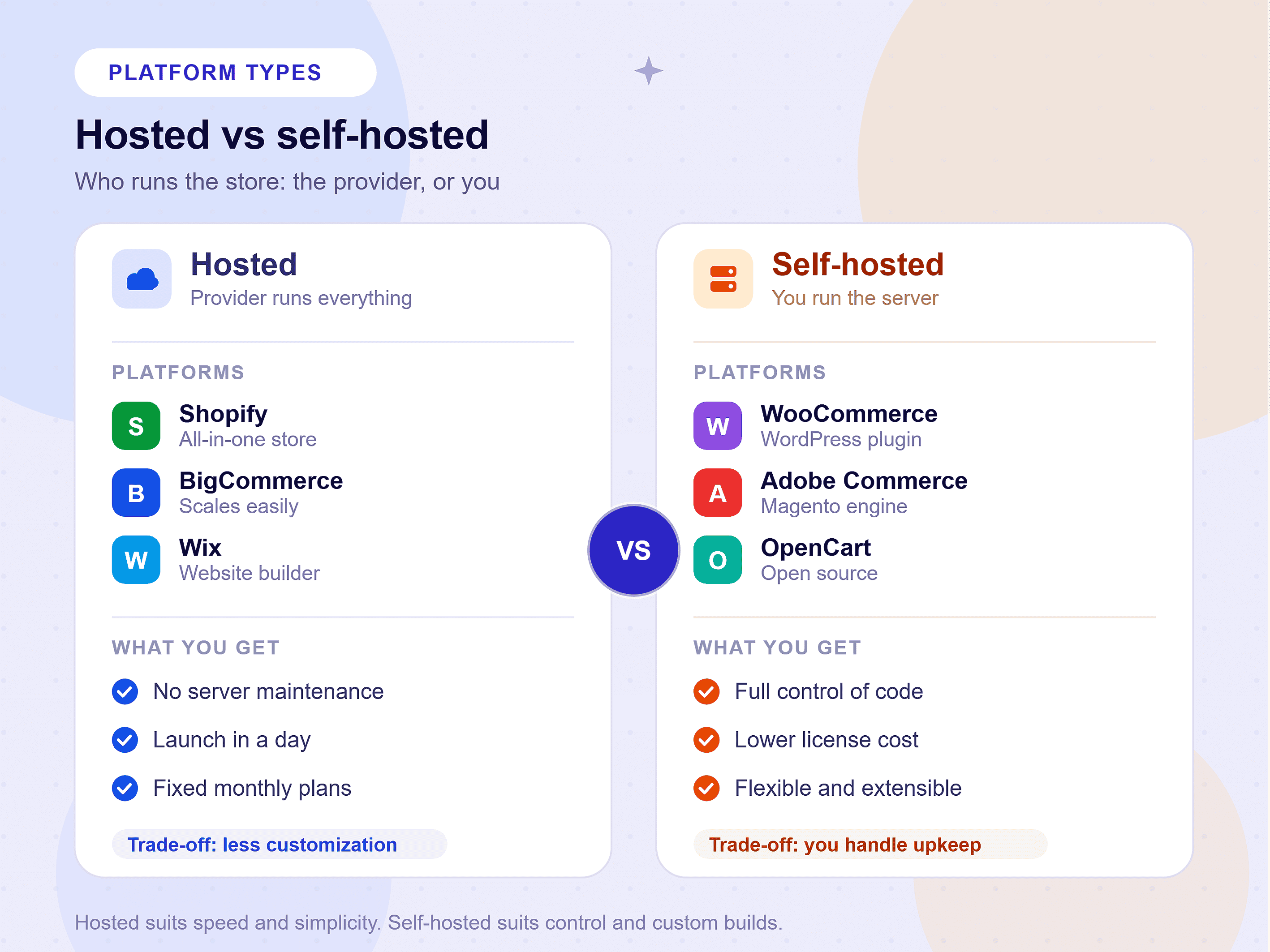
SaaS platforms (Shopify, BigCommerce, Wix, Squarespace) bundle hosting, security, CDN, and platform maintenance into their subscription fee. That simplicity carries a real cost premium. Shopify’s Advanced plan at $399/month becomes $700 to $900/month when you add five average paid apps. BigCommerce’s Scale plan at $399/month adds developer costs for customization that open-source platforms handle natively. Transaction fees on certain plans compound those figures further at volume.
Self-hosted platforms (WooCommerce, Adobe Commerce) separate infrastructure costs from feature costs. You choose and pay for hosting independently. That cost scales with your actual traffic, not your plan tier. A WooCommerce store on managed WordPress hosting at $100/month with three premium extensions at $150/year costs significantly less at low-to-mid volume than a comparable Shopify Advanced setup. At enterprise scale, the math inverts. Adobe Commerce’s $40,000/year cloud deployment, spread across $50 million in annual GMV, represents a smaller percentage than most SaaS licensing models.
Understanding the types of ecommerce platforms — hosted SaaS versus self-hosted open-source — is the first step toward an accurate 3-year cost model. The hidden costs that most comparisons ignore entirely:
- Plugin and app accumulation: Most Shopify stores add multiple paid apps over time. Monthly software costs can quietly grow to $300–$800, far beyond the base subscription price.
- Developer dependency: Self-hosted platforms require continuous maintenance and support. Expect ongoing retainers ranging from $300 to $2,000 per month for production stores.
- Migration expenses: Moving between ecommerce platforms can cost anywhere from $5,000 to $200,000, depending on catalog size, data complexity, and downtime requirements. Choosing the wrong platform has a real financial exit cost.
- Theme and redesign cycles: Every store eventually needs a visual refresh. Plan for redesign investments every two to three years, with costs typically ranging from $3,000 to $30,000 based on customization requirements.
The right TCO analysis covers a 3-year window. It accounts for projected GMV growth and includes every line item above. We build that analysis for every client at Webo 360 Solutions before recommending a platform.
Architecture and Security: Why SSL, PCI Compliance, and Headless Ecommerce Platform Readiness Matter for Scaling Globally
Every serious online store requires two non-negotiable security baselines: an SSL certificate and PCI DSS compliance. Without them, you cannot process payments legally. Google also actively penalizes non-HTTPS sites in organic search rankings.
Every hosted SaaS platform in this guide handles SSL provisioning and PCI Level 1 compliance at the infrastructure level. That includes Shopify, BigCommerce, Wix, Squarespace, Ecwid, Square Online, and Sellfy. You configure nothing. The moment your store is live, it meets the baseline.
Self-hosted platforms require you to manage both. On WooCommerce, you obtain and renew an SSL certificate through your hosting provider. Most managed WordPress hosts (Kinsta, WP Engine, SiteGround) provision SSL automatically through Let’s Encrypt. PCI compliance on WooCommerce depends on your payment gateway’s hosted fields implementation and your server configuration. Adobe Commerce Cloud on AWS meets PCI DSS Level 1 by default. On-premises deployments require a formal compliance audit.
Headless ecommerce platform readiness is increasingly important for brands projecting serious growth. A headless architecture separates your front-end presentation layer from your back-end commerce engine. Your development team can build fully custom, ultra-fast front-end experiences using modern frameworks like Next.js or React. Your commerce logic stays stable and independent.
Platforms with production-ready headless capabilities: Shopify (Storefront API), BigCommerce (GraphQL Storefront API), WooCommerce (REST API), and Adobe Commerce (GraphQL API). Wix, Squarespace, Square Online, and Sellfy do not support headless architecture. If your 3-year roadmap includes a custom front-end build, those platforms are architectural dead ends.
Going Global: Multi-Currency and Cross-Border Selling
If your business targets customers outside your home market, your platform choice directly determines your international revenue potential.
The US ecommerce market reached $1.19 trillion in 2024, according to the US Census Bureau retail trade data. The global opportunity is four times that size. Cross-border ecommerce continues to grow faster than domestic ecommerce overall, as US brands expand into the EU, UK, Canada, Australia, and Southeast Asia at scale. The platform that cannot support international selling with minimal friction is not a growth platform.
Key international selling requirements and which platforms meet them:
Multi-currency pricing and display: Shopify Markets, BigCommerce Multi-Storefront, and WooCommerce with currency plugins all support localized pricing. Squarespace and Wix offer basic multi-currency display but limited backend currency management.
Automated international tax calculation: Shopify’s native tax engine covers US sales tax across all 50 states and VAT for 30+ countries automatically. BigCommerce integrates with Avalara and TaxJar for equivalent coverage. WooCommerce requires the WooCommerce Tax plugin or a third-party service like TaxJar. Adobe Commerce has native tax rules but requires developer configuration for complex multi-jurisdiction scenarios.
International shipping integrations: All major platforms integrate with global carriers, including FedEx, DHL, UPS, and USPS. Shopify Shipping and BigCommerce’s native rate calculator offer the most streamlined multi-carrier rate shopping at checkout.
Localized checkout and payment methods: Shopify Markets supports localized language, currency, and regional payment methods, such as iDEAL for the Netherlands, Klarna for Germany and Sweden, and Alipay for China, within a single unified checkout. BigCommerce and WooCommerce require additional configuration to achieve the same coverage. For brands targeting specific regional markets, this is a concrete conversion rate optimization factor, not a cosmetic feature.
Custom domain configuration per market, hreflang tag support for international SEO, and GDPR-compliant data handling for EU customers complete the technical checklist for any brand targeting global audiences.
How to Choose the Right Ecommerce Platform
Many businesses compare ecommerce software platforms solely on monthly pricing, but long-term success depends far more on scalability, integrations, SEO flexibility, security, and total cost of ownership. The right platform should support your current needs while providing room for future growth as your online store expands.
Choose the Best Ecommerce Platform. Build It the Right Way.
The platforms in this guide compare the best options across every serious use case in ecommerce today. Shopify and WooCommerce dominate for good reason: they serve the widest range of business types with the deepest feature sets. BigCommerce delivers clear advantages for high-volume and B2B operations. Adobe Commerce handles the enterprise tier that every other platform cannot reach. Wix and Squarespace serve their audiences well within a defined scope. Ecwid, Square Online, and Sellfy each solve a specific operational problem better than any general-purpose alternative.
No single platform is objectively the best. The top-rated ecommerce platform is the one that matches your catalog complexity, technical team, growth trajectory, and total budget over a 3-year horizon.
Getting that decision right from the start saves you $50,000 to $500,000 in replatforming costs. Getting it wrong delays revenue, fragments your customer data, and forces a painful rebuild at the worst possible time.
Ready to Build or Scale Your Global Online Store?
Webo 360 Solutions | Ecommerce Development, Migration, and Architecture
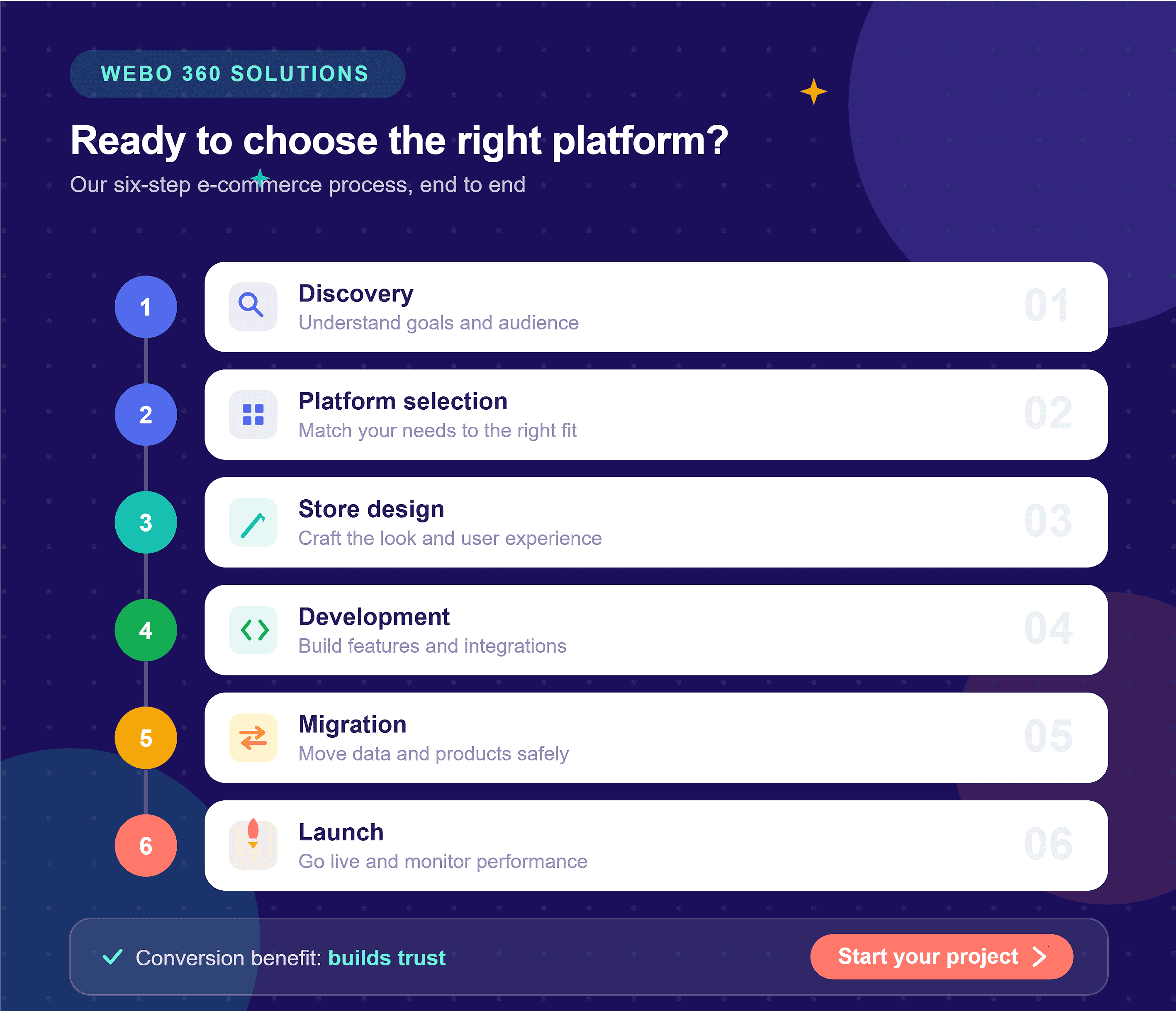
Building a high-converting, secure, and scalable online store is technically complex. Platform selection, infrastructure architecture, payment gateway configuration, SEO structure, performance optimization, and cross-border selling capabilities all require engineering precision, not guesswork.
We are the team that businesses across the USA, UK, UAE, Canada, and Australia trust. They come to us to choose the premier ecommerce platform and build it correctly the first time.
What We Deliver
-
✔Complete ecommerce development: Build and launch stores on Shopify, WooCommerce, BigCommerce, and Adobe Commerce with scalable architectures.
-
✔Zero-downtime migrations: Transfer products, customers, orders, and SEO equity with comprehensive redirect mapping and minimal business disruption.
-
✔Custom headless commerce solutions: Design and implement bespoke front-end experiences powered by modern headless ecommerce architectures.
-
✔Enterprise integrations: Connect Adobe Commerce and BigCommerce environments with ERP, CRM, and other mission-critical systems.
-
✔Managed development retainers: Provide ongoing enhancements, maintenance, and technical support for stores in active growth.
-
✔Free 30-minute tech-stack consultation: Help businesses choose the right ecommerce platform, whether launching a first store or scaling an enterprise operation.
No templates. No offshore handoffs. No platform commissions.
We recommend what is right for your business. Then we build it to enterprise standards.
Serving clients globally. Fixed-scope projects and monthly retainers available.
Frequently Asked Questions
Which ecommerce platform is best for SEO and custom URLs?
Shopify is the strongest SaaS platform for SEO at the mid-market level. It supports custom URLs, auto-generates canonical tags, and includes structured data markup on product pages. It also integrates directly with Google Search Console. Its one limitation is a fixed URL structure that includes /products/ and /collections/ prefixes. Removing these requires third-party workarounds.
For businesses where organic search is a primary acquisition channel, WooCommerce on well-configured managed hosting outperforms every hosted alternative on technical SEO depth.
Do hosted ecommerce platforms include SSL certificates and PCI compliance natively?
You do not manage certificate renewals, server configurations, or compliance audits. The platform handles all of it as part of your subscription. This is one of the most significant operational advantages SaaS platforms hold over self-hosted alternatives. On self-hosted platforms, SSL provisioning and PCI compliance depend on your hosting configuration and payment gateway implementation.
For self-hosted platforms like WooCommerce, reputable managed WordPress hosts such as Kinsta and WP Engine provision SSL automatically through Let’s Encrypt. They also maintain server-level security standards that support PCI compliance when paired with a properly implemented hosted payment gateway.
Can I migrate my store from one ecommerce platform to another without losing data?
The critical word is “properly.” Automated migration tools handle basic catalog transfers, but they routinely drop order history, miss custom field data, break product variant structures, and fail to map redirects correctly. A failed migration can cost you months of SEO equity and customer data integrity in hours.
At Webo 360 Solutions, we execute zero-downtime migrations for stores of every size. Our process starts with a full data audit. We then run staged testing in a parallel environment before cutover. A comprehensive post-launch redirect audit confirms zero ranking loss. If your store has more than 500 products or significant organic traffic, professional engineering is not optional on a platform migration. It is the difference between a clean launch and a six-month recovery project.
How do I choose the best ecommerce platform for my business?
A beginner launching a first store with under 100 products should start with Shopify or Wix for speed and simplicity of setup. A content-heavy brand with strong SEO goals should choose WooCommerce. A high-volume B2B operation should evaluate BigCommerce. An enterprise with $5M+ in annual revenue and a dedicated technical team should consider Adobe Commerce.
If you are unsure which e-commerce platform for your business fits best, the most efficient path is a 30-minute consultation with an experienced ecommerce engineer. One who has no stake in which platform you choose. That is exactly what we offer at Webo 360 Solutions.
Is Shopify or WooCommerce better for my store?
WooCommerce is better if you want full control, deeper SEO, and no platform lock-in. It runs on WordPress, so you own your code and data, and your content and product pages live in one CMS. Choose it when organic search is a primary channel, and you have development support.
The honest rule: pick Shopify for convenience and time-to-launch, WooCommerce for control and content-driven SEO. Your catalog size, technical team, and three-year growth plan decide which trade-off fits.
What is the best ecommerce platform for a small business?
Wix is the better pick if budget and simplicity lead your priorities, starting at $29/month with the easiest visual editor on the market.
WooCommerce wins when organic search drives your sales because its WordPress foundation provides a level of SEO control that most hosted ecommerce platforms cannot match, though it needs more hands-on maintenance.
The right answer depends on your strength. Choose Shopify for speed and ease, Wix for the lowest-effort launch, and WooCommerce for content and SEO.
What is the cheapest ecommerce platform?
WooCommerce is the cheapest way to run a full-featured store long-term, since the plugin is free and entry-level hosting starts at $3.99/month, though premium extensions and maintenance add up. Among standalone builders, Squarespace ($27/month) and Wix ($29/month) are the lowest-priced paid options.
One caution: “free” is never truly free. Processing fees, apps, themes, and a domain all add cost, so compare the total cost of ownership rather than the headline price.
What is the best ecommerce platform for beginners?
Shopify is the better choice if you want a beginner-friendly setup that still scales into a serious business, starting at $39/month, with the most intuitive admin of any major platform.
Squarespace suits beginners whose brand depends on visual design, thanks to its professionally built templates.
Avoid WooCommerce and Adobe Commerce as a first platform. Both reward technical skill and require ongoing maintenance, which slows down a first-time store owner.
Which ecommerce platform is best for large businesses and enterprises?
BigCommerce Enterprise is another strong choice for B2B brands and wholesalers that need API flexibility without maintaining their own infrastructure.
The deciding factor is resources. Enterprises with internal engineering teams benefit from Adobe Commerce. Businesses that prioritize operational efficiency and faster deployment often choose Shopify Plus.
Which ecommerce platform has the lowest transaction fees?
Shopify charges additional fees if you use third-party payment gateways instead of Shopify Payments. BigCommerce does not charge platform transaction fees regardless of your payment processor.
Over time, transaction fees can become one of the largest operating expenses for high-volume stores. Calculate the total payment cost at your projected revenue level before selecting a platform.
Can I sell internationally with these ecommerce platforms?
Shopify Markets simplifies international expansion for small and mid-sized brands. Adobe Commerce provides the deepest multi-store and localization capabilities for enterprise operations.
Success internationally depends less on the platform itself and more on your logistics, fulfillment, taxes, and localized customer experience.
Should I hire an ecommerce development company or build it myself?
If you need custom functionality, advanced integrations, migration support, headless commerce, or enterprise scalability, hiring an experienced ecommerce development company becomes a strategic investment.
At Webo 360 Solutions, we help businesses choose, build, migrate, and optimize ecommerce platforms based on long-term growth goals rather than short-term convenience. The right platform decision today prevents expensive replatforming projects tomorrow.