Top API Integration Tools in 2026: Architecting the Modern Tech Stack
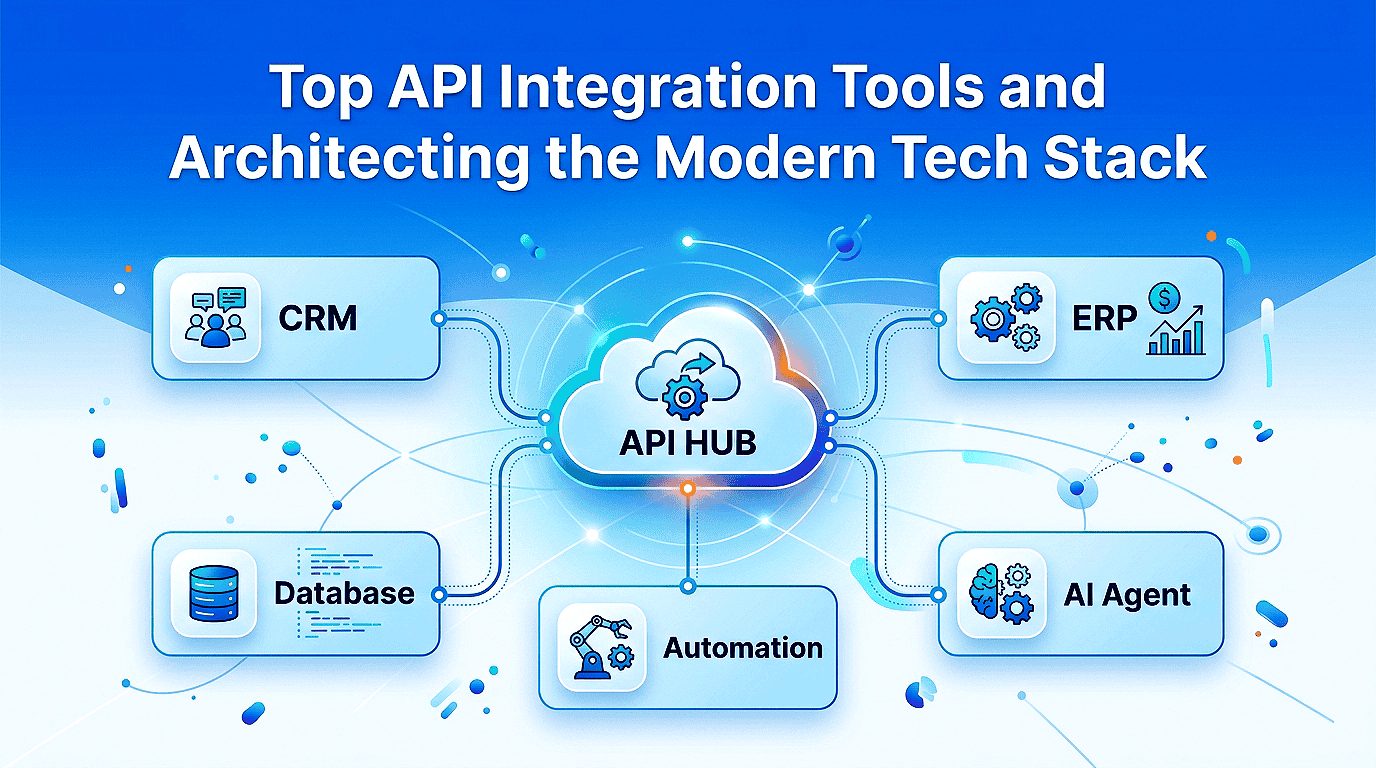
Your engineering team currently maintains 50 or more custom integrations. Each one cracks the moment a vendor renames a field, ships a breaking API version, or throttles your calls without notice. That maintenance overhead eats sprint capacity that belongs to your roadmap, not your plumbing.
The job changed in 2026. You no longer wire one app to another and walk away. You now connect AI agents that read data, make decisions, and run multi-step workflows on their own. This move toward agentic orchestration raises the cost of every wrong integration choice you make.
That pressure explains why spending keeps climbing. The iPaaS market is valued at USD 18.72B in 2026 and is projected to reach USD 54.78B by 2030, at a 30.8% CAGR. The right API integration tools now decide how fast you ship, how cleanly you scale, and whether your stack is ready for autonomous AI.
Methodology & Disclosure
This 2026 market evaluation draws on hands-on technical reviews of cloud-native integration systems, public vendor documentation, and category tracking current through mid-2026. Our analysis reflects production implementation experience rather than vendor marketing claims. Pricing ranges and compliance certifications are indicative and change frequently; confirm both against each vendor’s current documentation before you commit, and treat any third-party ranking as a snapshot tied to its publication date.
📌Key Takeaways
-
✔Integration is now an agentic problem, not a connectivity problem. The leading platforms support MCP and event-driven architecture, so your choice dictates whether your stack is ready or already obsolete.
-
✔The market is scaling fast, and so is the cost of choosing wrong. The iPaaS market sits at USD 18.72B in 2026 and is projected to hit USD 54.78B by 2030 at a 30.8% CAGR, while 50-plus custom point connectors quietly drain the sprint capacity that should fund your roadmap.
-
✔Pick your architectural category before you compare a single vendor. Use enterprise iPaaS platforms for internal data orchestration, automation platforms for fast internal workflows, and unified APIs for customer-facing integrations embedded in your product.
-
✔The unified API category has clear front-runners for product teams. Merge holds the Leader position for mature, enterprise-grade coverage across HRIS, CRM, and accounting, while Bindbee ranks Highest Performer for teams wanting a lean, product-led layer.
-
✔Three questions separate the right platform from an expensive mistake. Confirm data normalization, the maintenance model, and the compliance baseline (SOC 2 Type II, HIPAA, and GDPR). Connector count is a vanity metric; these three decide your real total cost of ownership.
Best API Integration Tools at a Glance
Choosing the best API integration tool depends less on features and more on the problem you’re solving. Enterprise organizations typically prioritize governance, compliance, and hybrid connectivity, while SaaS companies focus on embedded customer-facing integrations and faster deployment cycles. The table below highlights the strongest options in each category to help you quickly identify the right platform for your requirements.
Quick Recommendation: If your goal is internal business automation, start with iPaaS or workflow automation platforms such as MuleSoft, Boomi, Workato, or Zapier. If you’re building a SaaS product that requires customer-facing integrations, unified API platforms like Merge and Bindbee are typically the better architectural choice.
Quick Comparison: Best API Integration Tools in 2026
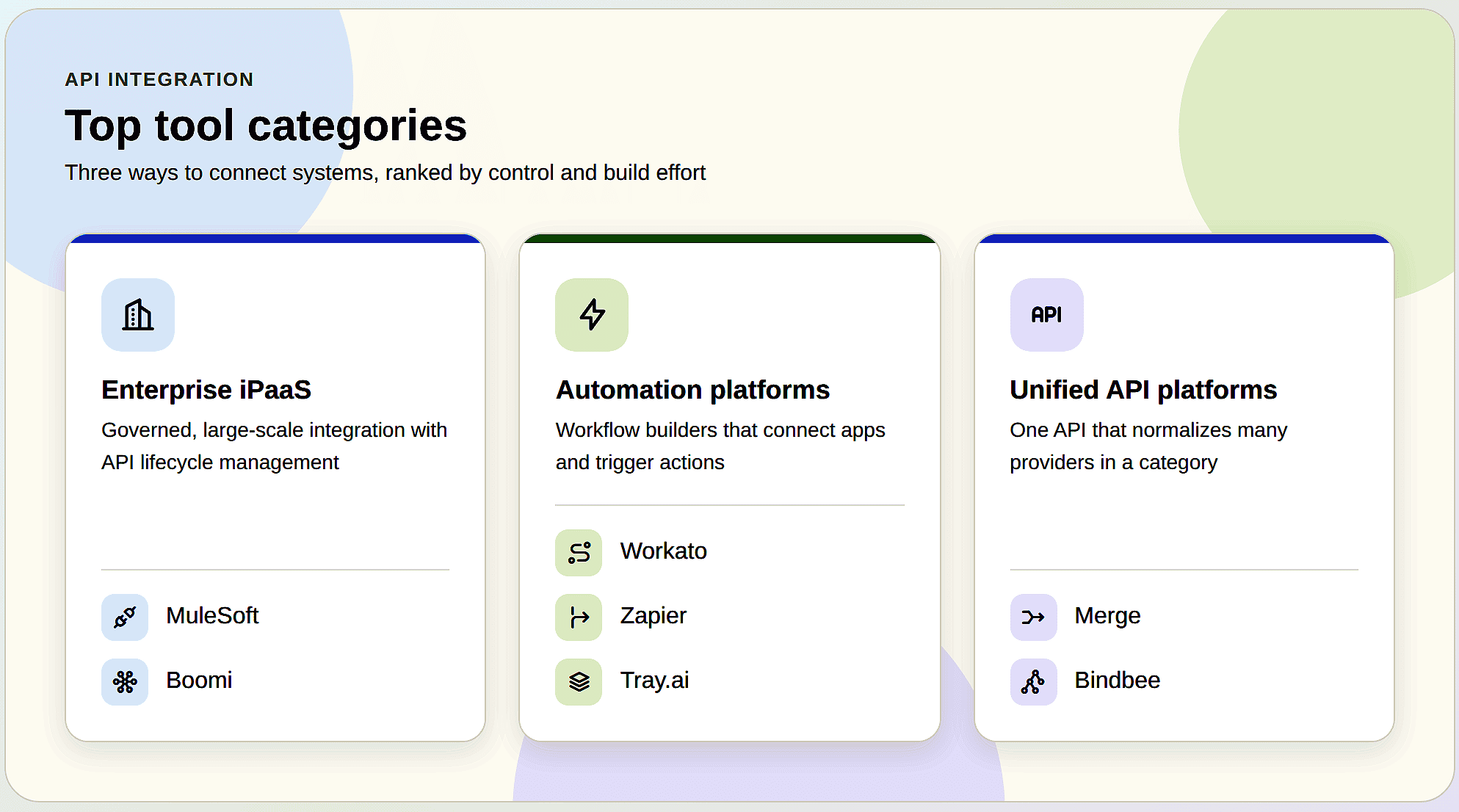
The API integration market has evolved beyond simple application connectivity. Modern platforms now support AI agents, event-driven architectures, and automated workflow orchestration. The comparison below provides a high-level overview of the leading solutions evaluated in this guide.
Quick Recommendation
- Choose MuleSoft or Boomi: Best for organizations that require enterprise-grade governance, security controls, compliance support, and hybrid cloud integration capabilities.
- Choose Workato or Tray.ai: Ideal for businesses focused on AI-powered workflow automation, orchestration, and complex enterprise process automation.
- Choose Zapier: The fastest no-code option for automating internal business operations and connecting popular SaaS applications.
- Choose Activepieces: A strong open-source and self-hosted alternative for organizations that prioritize flexibility, customization, and control over their automation stack.
- Choose Merge or Bindbee: Designed for SaaS companies that need scalable, customer-facing integrations delivered through a unified API layer.
Pricing Disclaimer: Pricing shown above is indicative as of 2026 and may change over time. Always verify the latest plans, features, and licensing directly with each vendor before making a purchasing decision.
The sections below provide a detailed evaluation of each platform, including architecture, key strengths, pricing considerations, compliance standards, ideal use cases, and potential limitations to help you choose the best API integration solution for your business.
What Are API Integration Tools, and How Does API Integration Work?
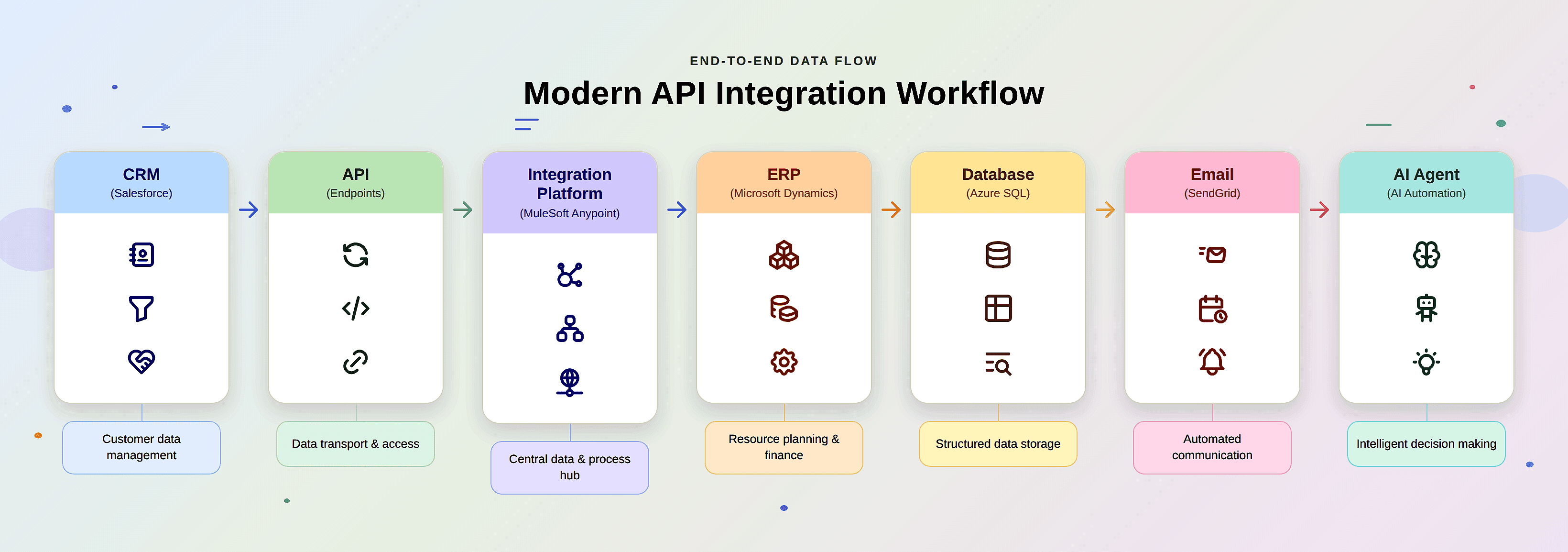
API integration tools are software platforms that connect separate applications, databases, and services so they exchange data and trigger actions automatically. They manage authentication, data mapping, error retries, and workflow logic, replacing brittle point-to-point code. In 2026, the leading platforms support AI agents, MCP (Model Context Protocol), and event-driven architectures across both cloud and on-premise environments.
API integration work follows a clear sequence under the hood. A source system emits an event or exposes an endpoint, the platform authenticates through OAuth or an API key, maps fields from the source schema to the destination schema, and delivers the payload with retries and backoff if a call fails. Modern platforms add queuing and buffering layers so traffic spikes do not drop records, while centralized logging provides a complete audit trail for every transaction.
MCP deserves a clear definition because it now influences platform selection. Model Context Protocol is an open standard that gives AI agents a consistent way to access tools and data sources. Instead of building a custom connector for every system an agent needs, organizations expose those systems through a standardized protocol. Agents can then interact with governed, normalized data pathways. As AI adoption accelerates, MCP support has shifted from a nice-to-have feature to a key evaluation criterion for modern integration platforms.
The Benefits of API Integration for Enterprise Teams
The benefits of API integration compound as your technology stack expands. Organizations replace fragile custom scripts with managed integration pipelines, reduce the engineering time spent fixing broken connectors, and establish a single source of truth instead of relying on disconnected spreadsheets and exports.
The value extends beyond operational efficiency. Teams ship new capabilities faster because core connectivity already exists. Operational risk decreases because the platform vendor absorbs much of the burden associated with upstream API changes. AI initiatives move faster because clean, normalized data enables agents to operate safely across systems. For regulated industries, integration platforms also provide the audit logs, governance controls, and access management needed to satisfy compliance requirements.
When to Use API Integration Platforms: The Three Paradigms
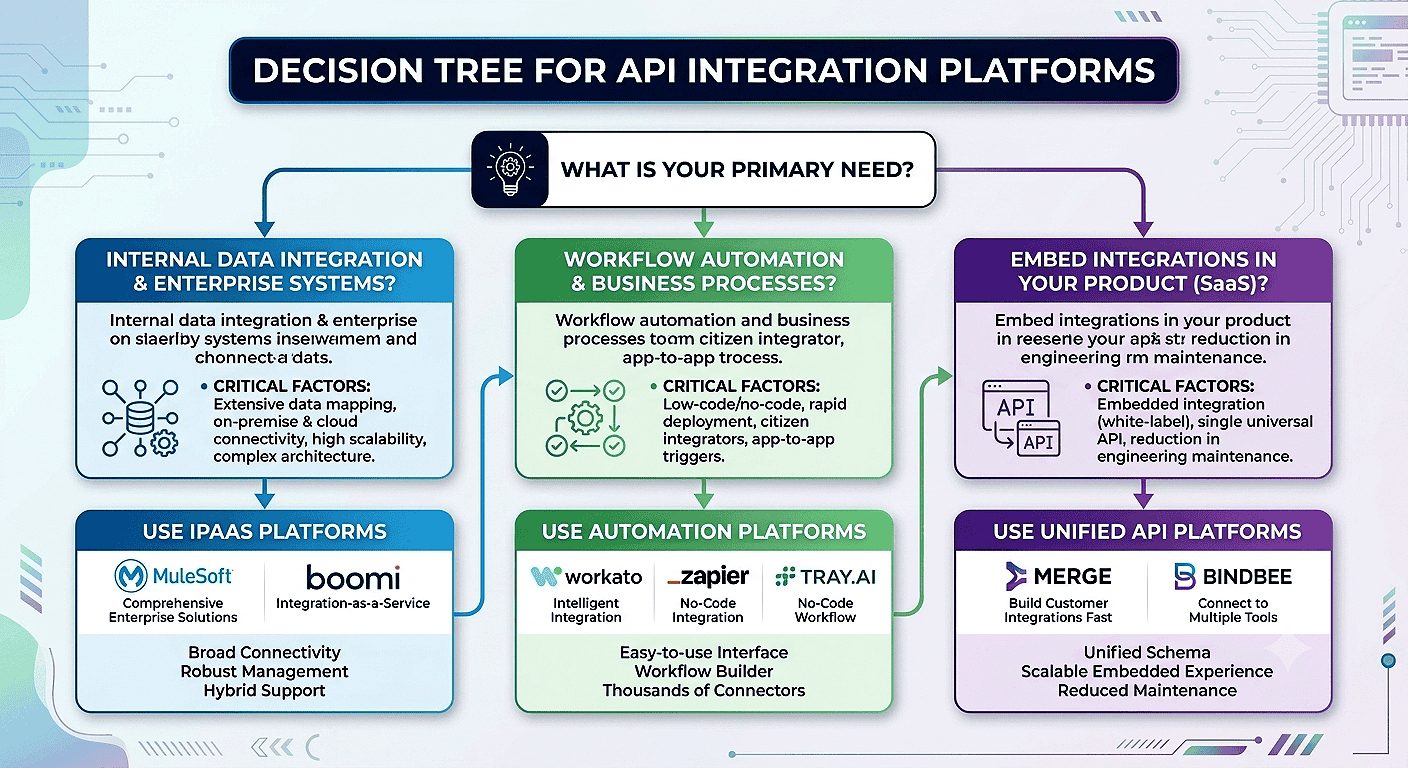
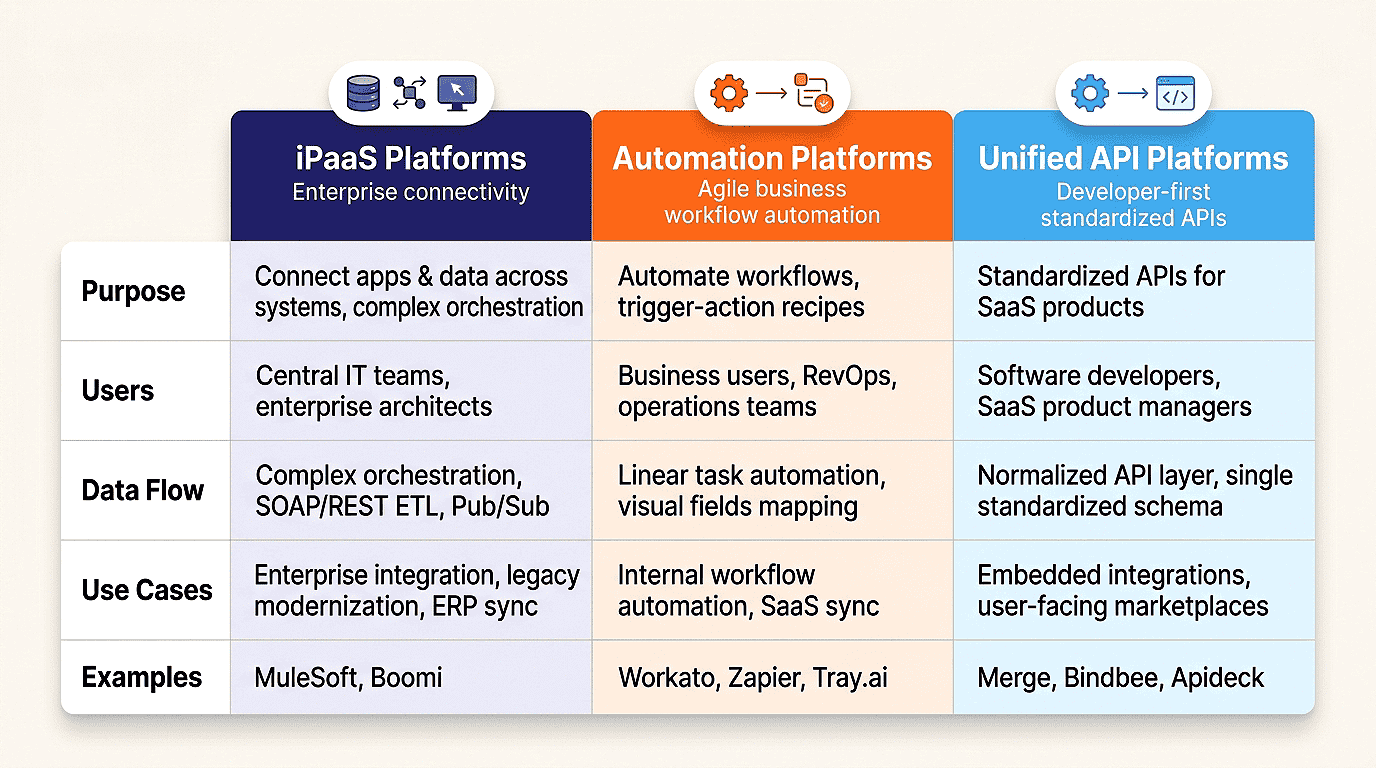
Most buyer guides lump every product into one ranked list. That approach fails because these platforms solve different problems and carry very different evaluation criteria. The market splits cleanly into three architectural categories, and your first decision is choosing the right category before comparing a single vendor.
Map your requirements to one of the three categories below. Internal data orchestration points toward iPaaS. Fast internal workflows point toward automation platforms. Customer-facing integrations inside your own product point toward unified APIs.
1. The Enterprise Integration Platform (Heavyweights for Hybrid and Governance Scale)
Enterprise iPaaS platforms run internal process and data orchestration at scale. They connect ERP, CRM, MDM, and legacy on-premise systems under centralized policy control, with audit logs, role-based access controls, and the governance depth required by regulated industries.
The 2026 generation pushes heavily into AI-ready data access and MCP compatibility, allowing agents to query enterprise data through governed, normalized pathways. MuleSoft Anypoint, Workato, and Boomi anchor this category. Organizations pay for hybrid connectivity, scalability, and governance while accepting longer implementation timelines in return.
2. Developer-First Automation Platforms (For Event Routing and Asynchronous Workflows)
Automation platforms have evolved beyond simple trigger-based workflows. Modern solutions route webhook events, orchestrate asynchronous processes, and embed LLM-powered steps and AI agents directly into workflow execution. This makes them one of the fastest paths from concept to deployment.
These platforms prioritize event-driven architecture over rigid, linear workflows, which becomes increasingly important when processing real-time signals from dozens of applications. Zapier, Activepieces, and Tray.ai lead this category, spanning no-code builders, open-source self-hosted environments, and enterprise-grade automation ecosystems. Their primary advantages are speed and flexibility, while deep governance remains secondary.
3. Unified API Platforms (The 2026 Trend for Embedded Multi-Tenant B2B SaaS Integrations)
Unified API platforms solve a challenge that traditional integration and automation platforms largely ignore: customer-facing integrations embedded directly within your product. Instead of building and maintaining dozens of individual connectors for HR, CRM, accounting, or ticketing systems, developers integrate once against a standardized API model.
This category handles schema normalization behind the scenes, allowing a single integration layer to support an entire ecosystem of providers across a multi-tenant customer base. Merge, Knit, and Apideck define this market segment, helping product teams deliver native integrations in weeks rather than quarters.
Essential Tools and Examples of API Integration: A Tool-by-Tool Evaluation
Category fit gets you to a shortlist. Implementation reality decides the winner. These examples of API integration platforms judge each product on what actually drains engineering time and maintenance burden, how the platform abstracts third-party API changes, and whether pricing holds up as you scale. Treat the pricing and compliance lines as indicative; confirm both against current vendor documentation before you sign, since tiers and certifications shift quarter to quarter.
MuleSoft Anypoint & Boomi: API Management and Governance at Scale
Both platforms serve enterprises that run hybrid environments and answer to auditors. They differ sharply on how much control versus speed they hand you.
MuleSoft Anypoint
Core 2026 Strength: Full-lifecycle API management with enterprise-grade governance. MuleSoft enforces centralized security policies, versioning, and reuse through a layered, API-led architecture that spans cloud and on-premise systems.
Best Use-Case: Large-scale integration programs inside regulated enterprises, especially banks, insurers, and healthcare systems, modernizing legacy infrastructure where partner integration and reuse matter.
Indicative Pricing: Annual programs commonly land in six figures and climb with capacity and connector count.
Compliance: SOC 2 Type II, HIPAA, PCI DSS, GDPR, and ISO 27001.
- Pro: Deep policy controls help govern high-volume API traffic across connected systems while providing audit logs and role-based access controls for compliance requirements.
- Pro: The API-led architecture allows teams to build connectors once and reuse them across multiple initiatives, reducing long-term development duplication.
- Con: The platform has a steep learning curve and typically requires developers experienced with DataWeave and MuleSoft’s tooling, increasing staffing and training costs.
- Con: Pricing scales with usage and capacity, making MuleSoft a significant investment that is often best suited for larger enterprise integration programs.
Boomi
Core 2026 Strength: Mature low-code iPaaS with flexible runtime deployment. Boomi pairs broad connector coverage with 2026 AI-assisted mapping that suggests field matches and reduces manual transformation work.
Best Use-Case: Enterprises needing governed cloud and on-premise connectivity, particularly around ERP and MDM data exchange, where master data accuracy is non-negotiable.
Indicative Pricing: Connection and usage-based, typically mid-five to six figures annually at enterprise scale.
Compliance: SOC 2 Type II, HIPAA, GDPR, and ISO 27001.
- Pro: Runtime flexibility allows the same integration process to run in cloud, on-premises, or private environments without requiring redevelopment.
- Pro: The visual low-code interface reduces onboarding time and helps smaller teams deliver integrations faster than traditional enterprise platforms.
- Con: Advanced data transformations and complex workflows often require specialized Boomi expertise, increasing long-term maintenance costs.
- Con: Usage-based pricing can rise significantly as integration volume and connection counts grow, making capacity planning essential before adoption.
Workato & Tray.ai: Scaling Business Operations Without the Code Bottleneck
These platforms remove the engineering bottleneck from business operations. They let build governed workflows that once required a developer queue.
Workato
Core 2026 Strength: AI-assisted enterprise orchestration moving firmly into agentic execution. Workato lets business teams build AI agents that run multi-step actions across systems, not just route data between them.
Best Use-Case: Cross-department workflow automation spanning CRM, ERP, support, and IT stacks, where a shared layer serves Salesforce, NetSuite, and ServiceNow at once.
Indicative Pricing: Annual contracts that commonly start in the low-to-mid five figures and scale with task volume.
Compliance: SOC 2 Type II, HIPAA, and GDPR.
- Pro: Business-friendly design combined with enterprise-grade capabilities allows teams to progress from simple workflow automation to AI-powered execution without building a separate integration layer.
- Pro: Strong event-driven architecture support enables reliable handling of real-time triggers, webhooks, and application events across complex software ecosystems.
- Con: Highly specialized object models and deep vertical customizations may require workarounds when platform limitations are encountered.
- Con: Task-based pricing can become expensive at scale, particularly when automation volume expands across multiple departments and business units.
Tray.ai
Core 2026 Strength: Enterprise orchestration fused with AI-agent building inside a no-code interface. Tray.ai gives business and IT teams a single canvas to build connectivity and intelligent agents together.
Best Use-Case: Complex internal workflows where business operators and IT need a shared, governed layer rather than competing shadow tools.
Indicative Pricing: Enterprise annual contracts, positioned above lightweight SMB products.
Compliance: SOC 2 Type II, HIPAA, and GDPR.
- Pro: Combines enterprise integration capabilities with agent and workflow development, making it a strategic platform beyond simple trigger-and-action automation.
- Pro: Flexible data processing supports custom business logic, advanced transformations, and standardized data model mapping for cleaner downstream integrations.
- Con: The platform’s flexibility introduces additional complexity, creating a learning curve for non-technical users before production deployment.
- Con: Its enterprise-focused positioning results in pricing that is significantly higher than most SMB-oriented automation and integration platforms.
Zapier & Activepieces: The Agile & Developer-First Workflow Sandboxes
One owns accessibility at scale. The other owns control through open source. Both fit fast internal workflows rather than heavy enterprise orchestration.
Zapier
Core 2026 Strength: The fastest path from natural-language intent to a deployed workflow. Zapier now layers AI copilots and agents on top of the largest connector catalog in the market.
Best Use-Case: SMB and mid-market operations, including lead routing, notifications, content operations, and lightweight internal workflows that teams need live today.
Indicative Pricing: Free tier to start, with paid plans beginning at approximately USD 20 per month. Team and Company tiers scale based on task volume and user seats.
Compliance: SOC 2 Type II, GDPR, and CCPA.
- Pro: Extensive app coverage and AI-assisted workflow creation allow teams to turn plain-English instructions into working webhook-driven automations within minutes.
- Pro: Standard integrations require minimal maintenance because Zapier manages most upstream API changes and connector updates on your behalf.
- Con: The platform can struggle with mission-critical, high-volume workflows that require advanced observability, strict error handling, and complex orchestration.
- Con: Task-based pricing can become costly as automation usage grows and workflows expand across multiple teams and departments.
Activepieces
Core 2026 Strength: Open-source automation with genuine self-hosting. Activepieces gives you a no-code visual builder while keeping workflows and data inside your own environment.
Best Use-Case: Teams that want control over deployment and data handling, avoid vendor lock-in, and build custom workflows without paying for a closed platform.
Indicative Pricing: Free and open-source for self-hosting; managed cloud tiers add paid plans.
Compliance: The managed cloud offering carries SOC 2 Type II certification, while self-hosted deployments inherit the compliance posture, security controls, and governance practices implemented by your organization.
- Pro: Self-hosting keeps sensitive credentials, automated requests, and workflow data within your own infrastructure, helping organizations meet data residency and compliance requirements.
- Pro: Open-source extensibility gives engineering teams full control to build custom integrations, implement specialized logic, and manage OAuth flows according to their own standards.
- Con: Infrastructure ownership shifts operational responsibility to your team, including hosting, monitoring, upgrades, backups, and uptime management.
- Con: The connector ecosystem is smaller than Zapier’s, so integrations for niche applications may require custom development and maintenance.
Merge & Bindbee: Unified APIs for Multi-Tenant Software Products
This pairing solves the product team’s problem, not the IT team’s. Both let you ship customer-facing integrations against a single standardized data model instead of maintaining dozens of point connectors.
Merge
Core 2026 Strength: Mature, enterprise-grade unified API coverage for embedding third-party integrations into B2B SaaS. Merge holds a leadership position in the unified API category because of its breadth of integrations, reliability, and mature developer experience.
Best Use-Case: Product teams building integration-heavy features across HRIS, CRM, accounting, and ticketing systems, where a single integration layer must support an entire ecosystem of providers.
Indicative Pricing: Usage-based pricing with a limited free tier for early linked accounts. Enterprise plans commonly scale into five-figure annual commitments.
Compliance: SOC 2 Type II, HIPAA, GDPR, and ISO 27001.
- Pro: Extensive schema normalization allows developers to integrate once and support multiple providers within the same category through a single standardized data model.
- Pro: Merge absorbs many underlying API changes from connected vendors, reducing maintenance overhead and minimizing disruption to your product roadmap.
- Con: Deep reliance on a third-party abstraction layer can create challenges when working with highly customized data structures, often requiring passthrough requests and additional handling.
- Con: Enterprise-oriented pricing is generally better suited to funded SaaS companies and larger organizations than to early-stage startups with limited budgets.
Bindbee
Core 2026 Strength: A high-performing unified integration layer with a sharp, product-led focus. Bindbee ranks among the highest-performing vendors in the unified API category for speed-to-deployment and integration delivery.
Best Use-Case: SaaS teams that need to ship embedded integrations quickly without building and maintaining point connectors, and that value a lean abstraction layer over a large enterprise integration stack.
Indicative Pricing: Product-led pricing with a lower entry point than many established enterprise-focused unified API providers.
Compliance: SOC 2 Type II and GDPR.
- Pro: A streamlined, product-led experience helps engineering teams launch customer-facing integrations quickly, with OAuth handling and connection management built in.
- Pro: The normalized integration layer supports event-driven synchronization and reduces maintenance effort when underlying provider APIs change.
- Con: As a newer platform, its connector ecosystem and supported integration categories are still growing compared to more established competitors.
- Con: The simplified abstraction model may not fully accommodate highly specialized enterprise workflows or complex edge-case requirements.
Architectural Comparison Matrix
Real-World API Integration Use Cases and Examples of API Integration
The clearest examples of API integration sit inside workflows you already run. A new Salesforce opportunity creates a NetSuite invoice without a human touching either system. A support ticket in Zendesk opens a Jira issue and posts to Slack. A new hire in your HRIS provisions accounts across email, payroll, and your identity provider in one synchronized sweep.
These API integration use cases share a pattern: a trigger in one system drives governed actions in others, with data normalized so nothing breaks downstream.
Legacy System Integration
Legacy system integration is where most enterprise programs earn or lose their budget. You connect a decades-old ERP or mainframe to modern cloud services through an iPaaS runtime that speaks both protocols, exposes the legacy data as clean endpoints, and shields newer systems from the old schema. Done right, you modernize without a risky rip-and-replace.
Data Integration and Real-Time Sync
Data integration keeps records consistent across systems that were never designed to communicate. You consolidate customer data scattered across CRM, billing, and support systems into a trusted source of truth, then maintain consistency through event-driven synchronization rather than delayed nightly batch processes.
How to Choose the Right API Integration Platform
Smart technology leaders stop comparing feature checklists and start comparing engineering realities. Three questions separate the right platform from an expensive mistake. Evaluate every shortlisted solution against these criteria before making a decision.
Data Normalization. Ask whether your use case requires a standardized schema or custom mappings for every application. Unified API platforms provide schema normalization out of the box, allowing a single data model to support multiple providers. Traditional iPaaS platforms offer greater flexibility but typically require manual mapping for each connected system.
Maintenance Model. This is one of the most overlooked buying criteria. When a third-party vendor introduces a breaking API change, who owns the fix? Unified API providers and managed automation platforms often absorb these changes on your behalf. Custom connectors inside an iPaaS environment generally become your engineering team’s responsibility.
Compliance Baseline. Enterprise buyers typically begin with SOC 2 Type II requirements, then add HIPAA, GDPR, PCI DSS, or industry-specific frameworks as needed. Verify that the platform encrypts data both in transit and at rest, secures OAuth credentials properly, and provides detailed audit logging for security reviews.
Best Practices for API Integration and Performance
Even the best platform will struggle under poor implementation practices. These recommendations help maintain stability and performance as integration volume increases.
API Protocols and Authentication
Standardize on modern API protocols and authentication mechanisms from the beginning. Use OAuth 2.0 whenever possible, rotate tokens before expiration, and never hardcode credentials. Prefer webhooks over polling when providers support them, as event-driven delivery reduces both latency and infrastructure load.
Testing Tools and Pre-Production Validation
Integrate testing directly into your delivery pipeline. Mock provider responses, validate field mappings against schema contracts, and execute end-to-end integration tests in staging before deployment. Detecting a mapping error during CI/CD is significantly less costly than discovering it in production.
Monitoring API Performance
Monitor integration performance with the same discipline applied to core applications. Track latency, throughput, success rates, and error rates for every connector. Alert proactively on rate-limit thresholds, and implement dead-letter queues to ensure failed payloads can be inspected and replayed without data loss.
Common API Integration Challenges to Plan For
Even well-designed architectures encounter recurring challenges. Common issues include breaking API changes from upstream vendors, inconsistent rate-limiting policies, schema drift between API versions, token expiration during long-running jobs, and pagination behavior that can silently omit records from large datasets.
The most effective integration platforms minimize these risks through managed retries, automatic token refresh, schema validation, version-aware connectors, and robust observability tooling. Selecting a platform that actively absorbs operational complexity reduces long-term maintenance costs and engineering overhead.
Looking for Custom API Integrations? Partner with Webo 360 Solutions
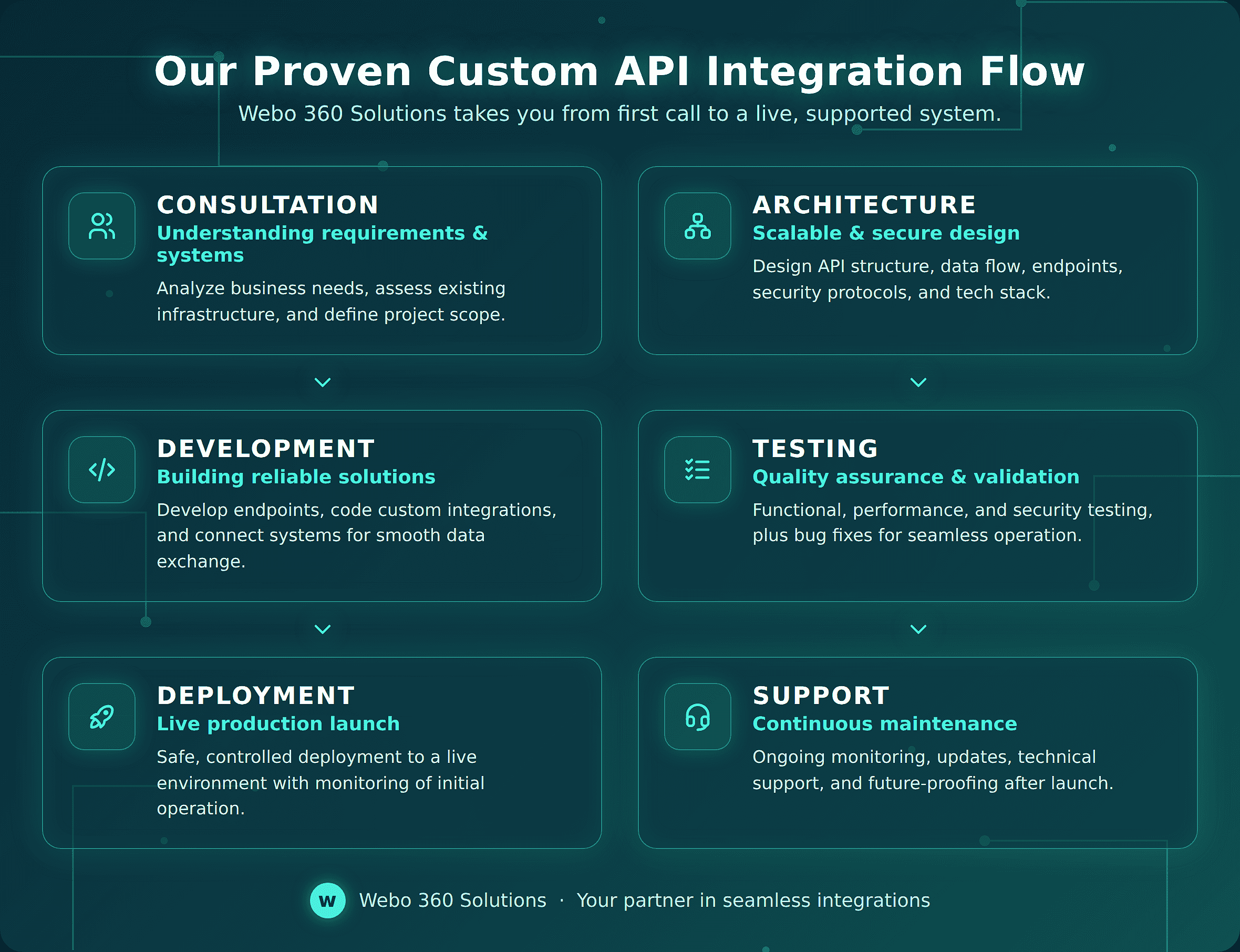
Off-the-shelf platforms cover the common cases. Your hardest integrations need a technical partner. Webo 360 Solutions helps global businesses design, build, and maintain secure, scalable API integrations tailored to their exact technology stack. We connect enterprise ERPs and CRMs, normalize fragmented data into clean schemas, and engineer real-time synchronization pipelines that remain reliable under production workloads.
We also build what modern organizations increasingly require: AI-driven agentic workflows that allow intelligent agents to operate safely across business systems. Our engineers manage OAuth authentication flows, integration maintenance, vendor API changes, and compliance requirements so your team can focus on product development rather than infrastructure troubleshooting.
Reach out to Webo 360 Solutions for a technical consultation, and let’s architect an integration layer built for 2026 and beyond.