AI Web Development Trends 2026: The Code Is Writing Itself (A Complete Guide)
AI makes developers 55% faster. According to GitHub and MIT research,AI coding assistants also help teams focus on more satisfying and complex work.This isn’t just about speed—it represents a fundamental shift in the developer’s role. In 2026, these efficiency gains are reshaping how teams work and shortening project timelines.
In practice, these tools can reduce project timelines by 30–50%.As AI in web development matures,the impact is driving real changes in team structure, delivery speed, and tooling decisions.

You are witnessing a fundamental shift in web development. Advanced AI systems can now handle the full build cycle. They can generate, test, and deploy applications with much less hands-on effort. Large language models and generative systems are driving a major shift in our industry. These tools change how web teams plan projects and structure workflows. They also allow you to build products faster from start to finish.
These tools can cut project timelines by 30–50%, reduce costs, and improve
consistency.This guide covers the major AI trends. It covers AI-assisted coding.It covers no-code and low-code platforms. It covers AI-driven security.It covers performance automation.
Our recommendations come from real data. From adoption patterns.From market signals.McKinsey, Gartner, and GitHub all show double-digit growth for AI development tools. This trend is driven by higher productivityand more businesses adopting AI.
This guide provides three aids. Practical checks for implementation.Security and privacy advice. Examples showing where human skill is still needed.
📌 Highlights
-
✔AI automates repetitive “boilerplate” tasks such as generating code and deployment scripts. This frees your team to focus on system architecture, UX strategy, and solving complex problems.
-
✔While AI tools dramatically accelerate output, their raw results are not production-ready. To maximize your ROI, you must use strong governance and skilled human review. You should also integrate security into your project from the very first day.
-
✔No-code/low-code platforms expand who can build web apps, while AI-assisted coding tools boost developer productivity.
-
✔Every AI adoption plan must prioritize three things: security, data privacy, and ethics. A detailed checklist is provided later in this guide.
-
✔This guide provides a practical roadmap to pick 3–5 priorities, pilot safely, and scale AI-enhanced workflows across your web stack.
-
✔Faster time-to-market, smarter personalization, automated performance optimization, and new developer roles.
-
✔Comparison of traditional vs AI-assisted development, industry adoption trends, and implementation roadmap.
“Use our AI-readiness checklist or request a short assessment to map AI into your roadmap.”
Get your custom AI roadmap today. Book a 15-Minute Readiness Call to receive a tailored plan and prioritized suggestions for your next AI pilot.
Introduction To AI Web Development Trends 2026
We are seeing the biggest shift in web development since the move to the cloud.The industry is transitioning from manual coding to AI-orchestrated creation.In 2026, this isn’t a speculative future; it’s the operational reality for leading teams.
AI has evolved from a simple curiosity into a core engine for businesses of all sizes.It now reshapes the entire product lifecycle, from the first design sprint to constant site optimization.This guide cuts through the hype to show you specific AI trends and tools.We provide the implementation strategies you need to build for the web over the next year.
Overview Of AI’s Role In Modern Web Development
Intelligent systems now support many critical aspects of web projects.AI tools generate code from prompts. They propose layouts. They automate routine work.They standardize quality. Machine learning watches users. It powers personalization engines.Content changes in real time. Interfaces change in real time. Analytics and automation work together.They improve the user experience. They increase relevance for visitors. This happens automatically.
✔
✔
✔
The Shift Towards Automation And Efficiency
The move toward automation is changing operational patterns.Testing automates. Debugging automates. QA tasks run on their own.Test suites evolve with the code. CI pipelines find edge cases fast.Faster than manual review.
AI-powered security systems work around the clock.They spot suspicious activity and identify vulnerabilities as they emerge.Search and SEO optimization also use machine learning to understand user intent and deliver better results.
These tools free teams from chores.Teams focus on strategy now. On system architecture.On accessibility. On privacy-by-design. On high-value UX work.Later sections give examples of tools.They explain security guardrails.They outline performance strategies.All for responsible adoption.
Understanding AI’s Impact On Web Development
Professionals who build web experiences are seeing their daily responsibilities shift substantially. In real-world projects, developers are no longer expected to write every line of code manually.Developers now act as system designers and reviewers.They direct intelligent tools, validate outputs,and make critical architectural and security decisions.Teams that use this model move much faster.They can scale quickly without losing code quality or making the system harder to maintain.
The systems handle routine code and tests.This frees the team.The team focuses on design.The team focuses on architecture.
Changing Developer Roles In An AI-Driven World
The developer’s role is going through its biggest change in decades.Engineers are moving from hands-on coding to becoming strategic architects andAI orchestrators.In 2026, your core responsibility is to define system requirements.You must focus on designing secure architectures and refining what the AI creates.This shift births new essential competencies:
Master prompt engineering by crafting precise, iterative instructions.You should also establish frameworks to test and validate every AI output for reliability.
Continuously monitor your AI-generated code.Look beyond functional correctness.Check regularly for performance issues, bias, and security drift.
Create a safe environment for AI.Set up security protocols and review gates to check all automated work.By using ethical guidelines, you can protect your users while scaling your development.
Example In Practice:
An engineer might prompt an AI to scaffold a complete authentication microservice.A developer’s value is no longer in writing every line of code.Instead, they must review AI-generated code for security flaws and harden business logic.These tasks require deeper expertise than ever before.

How AI Enhances Project Workflows
Intelligent assistants automate boilerplate generation, produce starter test suites,and draft documentation. They suggest refactoring. They catch bugs early.This cuts cycle time. This reduces fatigue.
The benefits are clear. Faster iteration. Less routine work. Easier experimentation.Teams use AI tools in CI/CD pipelines. They use no-code platforms for prototypes.This lets them validate faster. It lowers upfront costs.
Gains require governance. Define review processes. Integrate security scanning.Protect sensitive data strictly. The strongest outcomes come from pairing AI automation with thorough code review and testing.This reduces technical debt and improves the user experience.
AI Web Development Trends
By 2026, intelligent systems will shape every stage of the web development lifecycle.They impact how we design websites and how we build, deploy,and continuously optimize them in production.
Tools are no longer isolated. They form an ecosystem. Code generation. Personalization engines. Agentic workflows.Performance automation speeds delivery and improves experiences.
Your advantage will increasingly come from understanding and acting on AI web development trends.Case studies show a clear pattern: integrated AI toolchains cut time-to-market.For specific workflows, improvements of 40–60% are common,though results depend on project scope and team maturity.
Automation now extends across the delivery pipeline.Intelligent systems can perform continuous testing,orchestrate deployments, and iteratively optimize performance.They use machine learning for personalization.They deliver relevant experiences.They do it at scale.
New technologies create new possibilities.Neural networks personalize deeply.They power natural-language interfaces.Computational security advances change how teams build.This includes early post-quantum work.These evolving areas adopt a measured, evidence-based approach.
Strategic adoption matters.Choose focus over novelty.Select only 3–5 trends that align with your goals and what your team can realistically support.
✔
✔
✔
✔
✔
✔
✔
Speed And Productivity Gains With AI Code Generation Tools
AI in web development has unlocked notable boosts in programming efficiency.These platforms change routine work; they scaffold features,write tests, and generate documentation.This frees developers to focus on architecture, performance,and user experience.
Integrate these tools thoughtfully.They automate repetitive code.They offer smart suggestions.This cuts build time.This reduces reviewer effort.
GitHub Copilot And Cursor AI Speed And Functionality
GitHub Copilot is a coding partner.It reads your comments.It suggests snippets, patterns, or whole functions.Cursor AI analyzes the broader project context.It can suggest refactors,surface potential issues,and maintain consistency across files.
These tools dramatically reduce boilerplate and accelerate everyday development tasks.However, their output should never be treated as final.Human review remains essential to ensure security,performance, and alignment with architectural standards.A human must review it.Check for security.Check for performance.Check for architectural fit.
“The 30–50% productivity gains from these tools represent the most significant efficiency improvement in the history of software development.”
Performance Metrics Of Devin In Real-World Settings
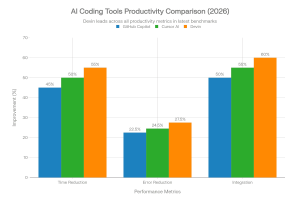
Devin and similar autonomous coding systems aim to resolve full development tickets.In one analysis, the autonomous agent Devin independently resolved 13.86% of GitHub issues.This demonstrates its early ability to handle specific tasks and ease onboarding.
Tool |
Reduction Error |
Reduction Integration |
Time |
|---|---|---|---|
GitHub Copilot |
40–50% |
20–25% |
Minutes to hours |
Cursor AI |
45–55% |
22–27% |
Minutes to hours |
Devin |
50–60% |
25–30% |
15–30 minutes |
AI-Assisted Coding Tools — Risks And Best Practices
✔
✔
✔
✔
Practical Prompt Example And ROI Tracking
Example prompt:
Expected output: Scaffolded routes, middleware, and a basic test suite to review and harden.
Revolutionizing Development With AI-Driven No-Code/Low-Code Platforms
No-code/low-code platforms powered by AI are expanding who can build web applications.These solutions let non-technical teams create.They let developers prototype fast.Much faster than before.
These platforms, Bubble, Webflow AI, and Wix ADI 3.0, read business needs and produce app structure and UI automatically.Tasks that once took weeks, such as layout, basic data modeling, and content population,can often be completed in days for many project types.
Businesses get to market faster.They spend less upfront.Their teams can iterate rapidly.No-code and low-code tools are growing fast.The market is projected to be large by 2030.This shows that enterprises are interested.
Platform Primary |
Strength Ideal |
For Custom |
Code Option |
|---|---|---|---|
Bubble |
Complex web app logic |
Startups, MVPs |
Yes |
Webflow AI |
Design-centric sites |
Portfolios, Marketing |
Yes |
Wix ADI 3.0 |
Fully automated setup |
Small businesses |
Limited |
Enterprises adopt these platforms. They build internal apps. They build marketing sites. They build prototypes.This addresses developer shortages. This speeds delivery. However, these platforms are not a universal replacement for custom development.
These tools have limits. You may face vendor lock-in. Performance may constrain high-traffic apps.Flexibility may be reduced for specialized needs. Consider security. Consider data governance.This matters most with business-critical data and enterprise systems. See the Security & Privacy section.
When to choose no-code/low-code vs. custom development
Illustrative Example:
Webflow AI lets marketing teams launch fast. Days, not weeks.Many companies report this result.
Hyper-Personalization Using Machine Learning In Web Applications
The era of one-size-fits-all web content is over. Modern web apps use machine learning.They adapt to each user. Content becomes more relevant. Engagement grows stronger.In the age of AI-driven development, personalization separates leading websites from the rest.
Research from industry vendors and surveys indicates consumers expect more tailored experiences.
For Example:
Dynamic Content Adaptation Based On User Behavior
Machine learning models analyze hundreds of data points for every visitor.These include navigation paths, session duration, and click patterns.They also track referral sources and contextual signals like device and location.These inputs power personalization engines.
The system adapts content in real time. It recommends products,reshuffles layouts, and shows relevant offers.
For Example:
Web apps can automatically promote product bundles based on browsing patterns.They can also adjust the homepage layout to highlight categories that a returning user liked before.Companies like Netflix and Airbnb have used recommendation models for years.Reports show these systems drive most of their user engagement.
The business impact is clear. Good personalization strategies often see double-digit growth in engagement and sales.
Typical ranges reported in case studies include:
Results will vary depending on your industry and how you use the tools.
Personalization Aspect |
Engagement Impact |
Conversion Improvement |
Implementation Complexity |
|---|---|---|---|
Content Recommendations |
45–55% |
18–25% |
Medium |
Layout Adaptation |
35–45% |
12–18% |
High |
Product Suggestions |
50–60% |
22–30% |
Medium |
Implementation Practical Steps For Businesses
Tools And Pipelines That Support Personalization
Use integrated tool chains for training and deployment. These should include data pipelines,model training frameworks, and online inference services. You may also need platforms for A/B testing and experiments. Many teams use AI tools to build features quickly. They also use monitoring platforms to detect model drift. Finally, automated tools help them deploy personalization safely at scale.
Privacy, Ethics, And Governance
Build privacy-by-design into your workflow. Follow these four steps:
Address algorithmic bias by testing models across segments and including explainability checks.
See the Security & Privacy section for a detailed governance checklist.
Performance-First AI Optimization For Core Web Vitals
Website speed is no longer just a technical concern; it’s a direct business driver.Faster page loads lead to higher conversion rates. Studies show that for every second you save, conversions can improve by roughly 7%.
Performance goals remain a priority. Most teams aim to load primary content in under 2.5 seconds. To rank well, you must meet these Core Web Vitals:
Intelligent systems now continually monitor and help remediate regressions against these metrics.
AI tools identify performance bottlenecks by analyzing user telemetry and synthetic tests.Depending on the platform, they can even automatically apply these optimizations:
Predictive loading is another powerful AI technique. It preloads the assets a user will likely need next. This creates a near-instant navigation experience.
Example tools and practical automation
SEO And Performance Implications Of AI-Built Websites
AI-generated code speeds up your delivery. However, it can sometimes produce bulky code bundles.You must set clear limits to keep your site fast. Without clear rules, AI-generated code can add too much JavaScript and create oversized bundles. These issues hurt your loading times and lower your search engine rankings.
To mitigate risks:
Developer And Business Action Items
Want a quick baseline? Try A Free Core Web Vitals Scan to find high-impact fixes. This tool can also help you estimate how much your sales will grow if your site gets faster.
Voice UI And Conversational Web Experiences
Web interaction is changing. Users are moving away from keyboards and touchscreens toward voice and chat. Voice and chat are now mainstream parts of the web.
Market trends show that voice channels are growing fast. As more people use them, you must optimize your site for natural language.
Integrating Voice Search For Enhanced User Engagement
Voice search favors full-sentence, natural language queries over short keywords. Capture voice search intent by structuring your content for conversational answers:
“Speaking is often much faster than typing on a phone. This improves completion rates for quick tasks and difficult steps.”
Take these practical steps to optimize for voice search:
Integration Aspect |
User Benefit |
Implementation Priority |
|---|---|---|
Natural Language Processing & Intent Mapping |
Faster, hands-free navigation |
High |
Structured Data (FAQ/QAPage, Schema) |
Improved visibility for snippets & voice answers |
High |
Local SEO & Short Answers |
Relevant local results and conversions |
High |
API Integration (Alexa, Google Assistant) |
Multi-device access and richer interactions |
Medium |
Voice UX Best Practices And Example Flows
SEO And Content Implications
Voice optimization and SEO work together. Use structured data and clear headings to help your content.Short, direct answers also increase your chance of becoming a spoken response or a featured snippet. Build critical pages with semantic HTML and fast rendering. This makes it easier for search and voice agents to read your content and deliver answers.
Tools And Readiness Checks
Use tools like Google Search Console and Lighthouse to check your site. These help you verify your visibility and see if you qualify for featured snippets. Add voice-query terms to your keyword research and test conversational flows in emulator tools and real devices.
Want help evaluating voice readiness? Start With A Voice-Search Audit to find your most important pages. Then identify the content changes you need to capture conversational search traffic.
Embracing Agentic AI Workflows In Modern Web Development
Web development environments are now self-managing ecosystems. In these systems, autonomous agents handle testing, deployment, and monitoring. They also take care of routine maintenance. These AI workflows handle repetitive DevOps tasks. This allows your team to focus on more important areas like architecture, security, and user experience.
Autonomous Testing, Deployment, And Monitoring Strategies
AI agents create test suites that grow with your codebase. They handle three vital tasks:
On the deployment side, these agents analyze your commits and run the right tests. They also spin up staging environments. Finally, they manage rollouts like canary or blue-green based on your policies. In monitoring, AI workflows analyze real-time user data to find errors. They can predict failures and trigger automated fixes. If needed, they will even roll back your site to a safe version.
To operate safely, autonomous agents work within human-defined rules. These include policy constraints and approval gates. You should also set clear rules for when a human needs to take over. You still define the guardrails. AI agents then execute tasks within those limits. They only surface critical decisions that require a human touch.
Safety, Governance, And AI-Driven Security Considerations
Design your guardrails before you deploy. Use role-based access controls to limit what agents can do. You should also keep permanent audit logs and require human approval for any major production changes. Treat deployment models as privileged systems. Restrict their access to sensitive data and require multiple approvals for big changes. You should also use full observability to trace every decision the AI makes.
AI security must protect the agents themselves. Ensure your agents cannot leak secrets or sensitive data. You should also run regular red-team tests to see how they behave under attack. Add model validation and drift detection to your governance plan. You should also include explainability checks to understand why your AI makes certain decisions.
Actionable Implementation Checklist (Pilot → Scale)
Responsible AI workflows deliver 24/7 efficiency. They can also greatly reduce manual DevOps work. In well-tuned systems, these tools can cut recovery times from hours down to just minutes. That said, rigorous testing, policy design, and human oversight remain essential.
Security And Privacy Challenges With AI Web Tools
AI-powered web tools offer huge efficiency gains. However, they also create new risks for security and data that you must manage. Many AI tools need access to your code and user data. Because of this, you must prioritize security and privacy. Make sure these are part of every stage in your development process.
Threats are evolving quickly. Reports show a big rise in web attacks recently. Attackers now focus more on automation pipelines and exposed APIs. Intelligent tools often process personal data for personalization. This makes regulatory compliance, such as GDPR and CCPA, a major concern for web developers.
AI brings new hazards beyond classic cyber risks. These include model leakage and the memorization of sensitive data. You must also watch for algorithmic bias, which can lead to unfair results. These problems can cause poor user experiences and legal liability if not addressed proactively.
Stay secure when you use AI tools. Use layered controls and clear rules to protect your data and systems.
Model Risk Management And Explainability
Developers must validate their AI models. You should run fairness and bias tests across different user groups. Also, keep track of where your training data comes from. Use explainability tools to understand why your model makes certain decisions. Keep an audit trail showing why a model made a decision—this supports troubleshooting, compliance, and user trust.
Legal & Compliance Checklist (Starter)
Practical Next Steps
Combine AI efficiency with human oversight. Always require a human to review any code the AI creates. You should also add security gates to your CI/CD pipeline and monitor both your code and the AI’s behavior. For teams adopting advanced AI features at scale, consider a formal security review focused on AI systems.
Step-By-Step Implementation Roadmap For 2026 Projects
Adopting AI in web development requires a deliberate, phased approach that balances speed with safety. Start by selecting 3–5 high-impact trends that align with your product goals and technical capabilities. Use short, measurable pilots to validate value before scaling across teams and platforms.

Adopting 3–5 Key Trends With Actionable Steps
Phase 0 — Assess (0–30 days):
Phase 1 — Pilot (30–90 days):
Phase 2 — Expand (90–180 days):
Phase 3 — Operate & optimize (180+ days):
Roadmap Table (High Level)
Phase |
Timeline |
Primary Activities |
KPIs |
|---|---|---|---|
Assess |
0–30d |
Tooling audit, use-case prioritization |
Use-case shortlist, baseline metrics |
Pilot |
30–90d |
Prototype with AI-assisted coding/testing |
Time saved per feature, QA cycle reduction |
Expand |
90–180d |
Scale personalization & automation |
Engagement lift, fewer production issues |
Operate |
180d+ |
Governance, monitoring, continuous improvement |
MTTR, conversion, performance budgets |
Actionable Insights For Businesses Preparing For AI-Driven Web Development
How Webo 360 Solutions Leverages AI In Modern Web Development
Here is how leading agencies are structured for AI. At Webo 360 Solutions ,we no longer just experiment with AI in silos. Instead, we integrate AI web development trends across our entire workflow.We treat it as a core competency integrated into our delivery lifecycle. Our approach is a three-phase flywheel:
-
✔Augment: We start by embedding AI assistants like Cursor directly into your workflow. This move accelerates the build phase without the need for a separate tool.
-
✔Automate: We identify repetitive tasks like Core Web Vitals fixes and security scanning. Then, we implement agentic workflows that run on their own. These systems stay safe because they are governed by strict policy rules.
-
✔Articulate: Finally, we focus our human talent on what they do best. Our team articulates complex business logic and crafts nuanced user experiences. This shift allows them to make the strategic decisions that AI cannot. The key insight from our client work? The teams that win are those who redesign their process around AI, not just sprinkle it on top.
Case Studies, Evaluation Criteria, And Next Steps
When you evaluate new tools, check how well they integrate with your stack.You should also consider the total cost of ownership and the vendor’s security practices.Use your pilot results to build a long-term plan.Create a template for the next 30, 90, and 180 days.This should assign roles, track success metrics, and include plans to lower risks.
The Technology Powering AI-Driven Frontend and Backend Development
AI web tools use a complex stack of technologies. Together, they automate repetitive work and create new assets.They also power intelligent experiences for your users. Learn these building blocks to choose the right solutions.This knowledge helps you apply them safely and effectively across all your web projects.
Your strategic advantage comes from picking the right technology for each problem.This might include recommendation engines, code generation, or edge inference.You must also know how to link these tools to your current development workflow.
Machine Learning, LLMs, And Automation Essentials
Machine Learning: Models find patterns in data to make predictions.They are used for recommendations, personalization, and anomaly detection.They can also forecast performance trends.They improve as more labeled or contextual data is available.
Large Language Models (LLMs): Are powerful neural networks trained on vast amounts of text.They can generate human-like code and documentation from simple prompts.These models power modern coding tools and content generators.
Automation: Systems combine AI outputs with developer rules.They link with your CI/CD processes to handle repeatable tasks.This includes testing, deployment, and automated fixes.Intelligent automation differs from scripting by adapting to changing inputs and outcomes.
Generative AI And Integration Into Web Solutions
Generative AI creates original assets like text and images.It can also build UI layouts and component libraries.These are all based on your specific brand rules.Generative models speed up prototyping in web development.They create content variations for A/B tests and help build design systems automatically.
Natural Language Processing (NLP) helps apps understand what users want.This technology powers voice UIs and chat-based interactions.Combining NLP with generative and retrieval systems yields richer, context-aware experiences.
Key Technologies Behind AI In Web Development (Brief Guide)
Limitations And Ethical Considerations
These technologies are powerful but imperfect. Models can hallucinate or repeat biases from their training data.They also pose privacy risks if you do not manage them properly. Plan for human review, explainability, and model risk controls. See the Security & Privacy and Ethics sections for concrete governance steps.
How To Pick The Right Tech
Match the technology to your specific problem. Use machine learning for predictions and personalization.Choose LLMs to build code and content. Use generative models for creative assets and edge inference for faster user experiences. Prioritize tools that use APIs to work well with others. You should also ensure you can host models in private environments when handling sensitive data.
AI transforms your development workflow through three key layers:
The gap between frontend and backend work is closing. Modern AI systems now generate and link code across the entire full stack. AI tools can build responsive UI parts and scaffold API endpoints.They even suggest database fixes. This lets your team focus on system design and UX strategy rather than repetitive tasks.
Front-end development is getting much faster. Tools can now turn text prompts into accessible, responsive components. They also suggest style systems that match your brand and run automated checks to find accessibility bugs early. This accelerates iteration on user experience while preserving human oversight.
Backend development platforms can now build API endpoints from data models. They also scaffold CRUD operations and suggest ways to tune your database for better speed. These tools can propose caching strategies for your site. They also suggest deployment setups that follow the latest security best practices.
Aspect |
Frontend Automation |
Backend Automation |
|---|---|---|
Component Generation |
Responsive UI from text prompts |
API endpoints from data models |
Quality Assurance |
Automated accessibility scanning & linting |
Database & performance optimization suggestions |
Implementation Speed |
50–70% faster layout coding (varies by project) |
Automated CRUD scaffolding & deployment templates |
Impact On Developer Roles And Skills
As AI handles more rote tasks, developers evolve toward strategic orchestration roles. Frontend specialists emphasize refining user experience, visual design systems, and accessibility. Backend engineers focus on secure architecture, data modeling, system observability, and performance engineering.
Key future skills for web developers include:
Mini-Workflow: From Prompt To A Deployed Microservice
This workflow balances speed and control. AI speeds up your scaffolding and suggestions. Meanwhile, human reviewers and automated policies ensure your site stays safe and high-quality.
Global Market Trends And Shifting User Expectations
Market forces around the world are raising the bar for websites and web applications. Web development trends are changing fast. To keep up, businesses must meet new user expectations for speed and mobile design. You also need to offer better personalization and seamless commerce flows
Current benchmarks to watch:
✔
✔
✔
Machine learning makes personalization a key differentiator. Many companies see much higher engagement and more sales when they use these tools responsibly. Infrastructure and scalability are still vital. Cloud and edge platforms are growing fast as businesses prepare to serve larger, more active audiences.
Industry Adoption Trends And Future Predictions (Beyond 2026)
Looking ahead to 2027–2032, expect these macro trends to accelerate and shape the new web:
✔
✔
✔
✔
✔
Actionable Insights For Businesses
✔
✔
✔
✔
Future Projections For AI-Powered Web Development
The future of web development will move fast after 2026. New technologies and business models will continue to change how we build for the web. Preparing for the future web means investing in flexible architectures and continuous learning. You also need governance plans that can adapt as innovation accelerates.
Emerging Technologies And The Next Wave Of Innovations
Several technological shifts will shape the next decade of web development:
✔
✔
✔
✔
✔
Industry Adoption Trends And 2027–2035 Forecast
Over the coming years, anticipate these adoption patterns:
✔
✔
✔
✔
Impact On Developers And Future Skill Requirements
The role of web developers will continue to shift. Key skills that will be in demand include:
Limitations, Risks, And Ethical Considerations
Advanced AI capabilities bring new risks. Models can hallucinate or amplify human bias. They also pose privacy risks and can be misused for surveillance or deepfakes. Use ethical design and thorough bias testing to protect your users. You must also include humans in the loop controls and clear governance frameworks to maintain trust and prevent harm.
Practical Steps To Future-Proof Your Web Strategy
Conclusion
AI adoption is quickly becoming a defining factor between digital leaders and laggards. Organizations should adopt AI strategically through measured pilots and strong governance. By including human oversight, they see faster delivery and more resilient web platforms.
Those who move strategically will succeed, while others will struggle to keep pace with modern web trends. The innovations in this guide form a powerful new ecosystem. Tools like AI-assisted coding and low-code platforms are changing the industry. Together with agentic workflows, they reshape how we build, secure, and optimize web applications.
Your success depends on a new way of working. Developers should stop writing every line of code. Instead, you should orchestrate intelligent systems and validate AI outputs. You can then focus your energy on system architecture and UX. At the same time, businesses must approach adoption methodically—pilot, measure, govern, then scale.
Ready to Move from Theory to Practice?
Our Free AI-Powered Website Audit goes beyond generic tips. In 15 minutes, we’ll deliver a prioritized report showing:
Get Your Free 2026 AI Readiness Audit – Receive your customized report and a 15-minute consultation to discuss your #1 priority.
Next Steps (Practical)
Webo 360 Solutions approaches AI adoption as a phased program. AI helps you move from design to MVP faster. You can integrate automated performance monitoring to protect your Core Web Vitals. You should also add security checks to scan any AI-generated code before you merge it. The emphasis is on measurable pilots, governance, and safe scaling.
Frequently Asked Questions
How will artificial intelligence change the role of web developers?
What are the primary security risks when using AI code generation tools?
Which AI tools are most effective for improving website performance and Core Web Vitals?
Can no-code platforms built with AI truly replace custom development for complex applications?
- MVPs: Building a Minimum Viable Product in days, not months.
- Marketing: Launching high-performance sites quickly.
- Internal Tools: Automating business workflows without a full dev team.
- Speed: Accelerating delivery compared to fully custom code.
Custom development remains essential for unique systems. If your project must scale or requires high performance, a specialized architecture is the better choice.
How does machine learning enable hyper-personalization in web applications?
What is an agentic AI workflow, and how can I implement it?
Follow these four steps to deploy agents safely:
- Start Small: Launch limited-scope pilots to test core logic.
- Set Boundaries: Define guardrails and approval gates for high-risk actions.
- Monitor Everything: Use observability tools to track agent behavior and decisions.
- Scale Safely: Expand responsibilities only after performance metrics are proven.