WebGPU Browser Support: A Comprehensive Guide To Modern Gpu Acceleration On The Web

Introduction
The web grows more powerful. It provides rich and interactive experiences. But for hard tasks—3D games, simulations, machine learning—the browser has always been limited. This is changing rapidly with the advent of WebGPU, a modern graphics API designed to unlock the full potential of modern GPU programming.
WebGPU replaces WebGL. It gives a direct line to the graphics hardware. This means more speed and control. Developers can now build powerful applications in the browser. But adoption depends on browser engines, hardware, drivers, and operating systems. Behavior differs across platforms, and applications must account for those differences.
This guide explains WebGPU support. Which browsers have it? What must developers know? What can you build? We show the compatibility landscape. We give practical advice on detection and fallbacks. We show why WebGPU changes web graphics.
Highlights
WebGPU is no longer a nascent technology confined to experimental builds. Its progressive rollout across major web browsers signifies a fundamental shift in what’s possible on the web. Developers get the power of dedicated graphics hardware. They can now build for the browser what once required a native app.
WebGPU is made for modern graphics hardware. It learns from native APIs: Direct3D 12, Metal, and Vulkan. The alignment makes commands more efficient. It manages resources better. It cuts CPU overhead. This matters most for complex graphics and heavy computation.
Key Takeaways
- Progressive Adoption: WebGPU is now supported across Chrome, Firefox, Safari, and Edge
- Performance Benefits: Reduced CPU overhead and more efficient GPU utilization
- Feature Detection Required: Always implement navigator.gpu checks with fallback strategies
- Wide-ranging Applications: From 3D gaming to machine learning inference
WebGPU Browser Support Status and Compatibility Overview
WebGPU is available today in all major browser engines. It runs in Chromium, Firefox, and Safari. But support is not uniform.
WebGPU does not depend on the browser alone. It depends on the GPU. It depends on the driver. It depends on the operating system.
Some devices work well. Others do not. This is expected.
WebGPU is ready for production only when applications use feature detection and fallbacks. Without that, failures are common.
Important Note on WebGPU Support:
Never assume WebGPU support from browser or OS versions alone. GPU hardware, drivers, and platform backends determine success. Production applications must rely on runtime detection and graceful fallback paths.
Chrome and Chromium-Based Browsers
Chromium browsers provide the widest WebGPU coverage.
On desktop systems, WebGPU runs when the GPU and driver support modern graphics backends:
- Direct3D 12 on Windows
- Metal on macOS
- Vulkan on Linux and ChromeOS
Most modern desktop GPUs work. Older drivers often fail.
On Android, support varies widely. It depends on the GPU vendor, driver quality, and system image. Newer devices work more often. Older phones frequently fail.
Do not rely on browser or OS versions. Always detect support at runtime.
Firefox
Firefox supports WebGPU on selected desktop platforms.
Availability depends on:
- GPU backend support
- Driver stability
- Operating system capabilities
Support continues to expand. Behavior differs by system. Do not assume availability. Always check.
Safari and Apple Platforms
Apple provides WebGPU across its platforms using Metal.
WebGPU runs on:
- macOS
- iOS
- iPadOS
- visionOS
Support depends on the device generation and operating system. Newer hardware works best. Older devices may lack required features.
Apple’s implementation is consistent, but not identical across devices. Test on real hardware.
Other Major Browsers and Engine Notes
Privacy-focused browsers often use Chromium. When Chromium gets WebGPU, so do they. Always verify the specific engine version within these browsers.
WebGPU Browser Support Table for Quick Scanning
WebGPU support is capability-based, not version-based.
Browser name alone is not enough. Version numbers are not enough. Hardware and drivers decide what works.
Use this table as a guide, not a guarantee. Always test at runtime.
Browser / Engine |
Platform Availability |
Notes |
|---|---|---|
Chrome / Edge (Chromium) |
Desktop and mobile on supported hardware |
Broadest coverage today. Uses Direct3D 12 on Windows, Metal on macOS, and Vulkan on Linux and ChromeOS. Android support varies by GPU vendor and driver. |
Firefox |
Selected desktop platforms |
Availability depends on backend support and driver stability. Coverage continues to expand. Behavior varies by system. |
Safari / WebKit |
Apple platforms with supported devices |
Uses Metal across macOS, iOS, iPadOS, and visionOS. Support depends on device generation and OS capabilities. |
Note: WebGPU availability cannot be inferred from browser name or version alone. Applications must rely on navigator.gpu checks, adapter selection, and device creation to determine real support on a given system
How to Detect WebGPU and Handle Fallbacks Gracefully
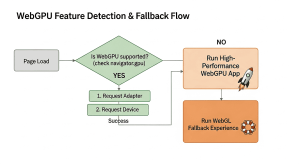
Implementing WebGPU requires a proactive approach to detection and fallback mechanisms. The goal is to leverage GPU power when available while ensuring seamless experiences for users on less capable hardware.
Feature Detection and Initialization
The primary gate for WebGPU availability is checking for the navigator.gpu object. Here’s a robust implementation pattern:
// javascript: WebGPU initialization with graceful fallback
async function initializeGraphicsSystem() {
// 1. Feature Detection
if (!(‘gpu’ in navigator)) {
console.warn(‘WebGPU is not supported by this browser. Falling back to WebGL.’);
initWebGL();
return;
}
let adapter;
let device;
try {
// 2. Request Adapter
adapter = await navigator.gpu.requestAdapter();
if (!adapter) {
console.warn(‘No suitable GPU adapter found. Falling back to WebGL.’);
initWebGL();
return;
}
// 3. Request Device
device = await adapter.requestDevice();
if (!device) {
console.warn(‘Failed to acquire GPU device. Falling back to WebGL.’);
initWebGL();
return;
}
console.log(‘WebGPU initialized successfully.’);
// 4. Proceed with WebGPU specific initialization
initWebGPUPipeline(device);
} catch (error) {
console.error(‘An error occurred during WebGPU initialization:’, error);
// 5. Graceful Fallback on Error
initWebGL();
}
}
// Placeholder functions
function initWebGL() {
console.log(‘Initializing WebGL as fallback rendering path.’);
// … WebGL initialization logic …
}
function initWebGPUPipeline(device) {
console.log(‘Initializing WebGPU pipeline and rendering.’);
// … WebGPU specific setup …
}
// Call on page load
initializeGraphicsSystem();
Fallback Tiers and Practical Options
- Tier 1: Native GPU Path (WebGPU) – Preferred path with the highest performance
- Tier 2: WebGL – Broad compatibility fallback
- Tier 3: CPU Code Paths – For devices lacking adequate GPU support
Device Limits Checklist
Validate these key limits during initialization:
| Limit | Purpose | Fallback Strategy |
|---|---|---|
| maxTextureDimension2D | Maximum texture size | Reduce texture resolutions and mip levels |
| maxStorageBufferBindingSize | Maximum buffer size | Implement data chunking |
| maxComputeWorkgroupSize | Parallel thread limits | Adapt dispatch sizes and tiling strategies |
| maxVertexBuffers | Buffer count limits | Simplify vertex attribute layouts |
Telemetry and Privacy Considerations
Collect anonymized telemetry with these keys (prioritizing privacy):
- adapter.vendor – Anonymized vendor identifier
- adapter.name – GPU model name (generic)
- adapter.limits – Key device limits snapshot
- Initialization success/failure counts
- Error categories for debugging
WebGPU vs WebGL: Why WebGPU Is A Step Forward
WebGPU vs WebGL: High-Performance GPU-Accelerated Web Apps
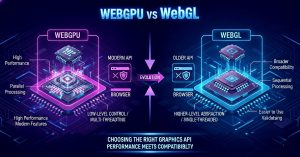
Developers face a choice. The old OpenGL way. Or the new way, built for modern GPUs. The new way gives predictable, high-performance results on the web.
Modern API Alignment And Long-Term Feature Growth
WebGL gave the web real-time graphics. But it was based on OpenGL ES 2.0. This limited the new features. It made computer work awkward. By contrast, the newer set of apis maps to native layers such as Direct3D 12, Metal, and Vulkan. The alignment makes three things possible. Richer pipeline designs. Explicit control over resources. Predictable shader behavior as hardware changes.
Compute-First Capabilities And Practical Decision Lens
Computing is first-class in WebGPU. This enables GPGPU in the browser. It runs ML inference. It runs a physics simulation. It transforms large-scale data. The pipeline model and WGSL shader workflows reduce per-object CPU cost and make advanced effects more efficient at scale.
Aspect |
WebGL (legacy) |
Modern API |
|---|---|---|
| Lineage | OpenGL ES 2.0 | Direct3D12 / Metal / Vulkan |
| Compute | Limited, workaround-heavy | First-class GPGPU |
Recommended use |
Wide fallback for older devices | High-performance, feature-rich apps |
Decision Criteria — When To Pick WebGPU Vs WebGL
- Need local ML inference? Need large compute kernels? Need multi-pass rendering? Use WebGPU. Its pipeline and compute features are made for this.
- Many users have old devices, and many use old browsers. For them, ship WebGL. For others, add WebGPU. Use progressive enhancement.
- Measure your users and set a threshold. If too few can run WebGPU, use WebGL first. Let early adopters opt in to WebGPU.
Recommended Migration Path
- Prototype critical kernels in WGSL and validate on representative devices.
- Adopt an engine or library that supports WebGPU (reduces low-level work and speeds time to production).
- Build a test matrix weighted by device. Gate features with capability checks. Always have WebGL and CPU fallbacks.
- Roll out gradually, monitor telemetry, and expand coverage as vendor support matures.
High-Impact Use Cases Enabled by WebGPU
Gaming
WebGPU makes 3D web games look and feel like desktop games. It does this by cutting CPU overhead and smoothing the frame rate. Engines like Babylon.js and Unity’s web export pipelines demonstrate this potential.
Machine Learning on the Page
Machine learning libraries use WebGPU. TensorFlow.js uses it. ONNX Runtime Web uses it. Transformers.js uses it. They run inference locally on compute shaders. This is faster. This is more private.
Data Visualization
GPU acceleration scales rendering. It handles dense scatterplots. It handles large heatmaps. It handles interactive 3D scenes. The UI stays fast, even with vast data.
WebGPU Architecture Basics

Typical Execution Flow
- Check availability: (‘gpu’ in navigator)
- Request adapter: navigator.gpu.requestAdapter()
- Request device: adapter.requestDevice()
- Create shader modules from WGSL code
- Create render or compute pipelines
- Encode commands using GPUCommandEncoder
- Submit work to device.queue
Minimal WGSL Example
@fragment fn main_frag() -> @location(0) vec4<f32> {
// Returns a semi-transparent orange color
return vec4<f32>(1.0, 0.5, 0.0, 1.0);
}
Technical Requirements, Limitations, and Security

OS Backends
- Windows: Direct3D 12
- macOS/iOS: Metal
- Linux/ChromeOS: Vulkan
- Android: Vulkan (driver-dependent)
Security and Isolation
WebGPU uses logical devices (GPUDevice). They sandbox the environment. They block direct hardware access. They keep the system safe.
Current Constraints and Performance Pitfalls
Common Issues:
- Frequent CPU↔GPU memory transfers
- Eager buffer mapping is causing CPU stalls
- Tight synchronization negates GPU benefits
Mitigation Strategies:
- Batch submissions to reduce CPU overhead
- Reuse command buffers and render bundles
- Prefer asynchronous readbacks
- Design efficient data layouts
WebGPU vs WebGL: A Comparative Analysis
Aspect |
WebGL (legacy) |
WebGPU (Modern) |
|---|---|---|
| API Lineage | OpenGL ES 2.0 | Direct3D 12 / Metal / Vulkan |
| Compute Capabilities | Limited, workaround-heavy | First-class GPGPU support |
| CPU Overhead | Higher per-draw call | Significantly reduced |
| Resource Management | Implicit, error-prone | Explicit, predictable |
Shader Language |
GLSL | WGSL (modern, type-safe) |
When to Choose WebGPU vs WebGL
Choose WebGPU when:
- Critical need for local ML inference
- Complex compute kernels required
- High-fidelity multi-pass rendering
- Targeting modern hardware and browsers
Consider WebGL when:
- Supporting older devices is essential
- Maximum browser compatibility needed
- Implementing a progressive enhancement strategy
- User analytics show low WebGPU compatibility
Recommended Migration Path
- Prototype Kernels: Start with critical compute/rendering techniques in WGSL
- Layer Integration: Add WebGPU as an optional enhancement layer
- Progressive Rollout: Enable WebGPU for compatible users while maintaining WebGL fallback
- Performance Monitoring: Use telemetry to track adoption and performance
- Feature Parity: Gradually move features to WebGPU as adoption increases
How Webo 360 Solutions Can Help With WebGPU Adoption
WebGPU Readiness, Implementation, and Cross-Browser Support Services

Webo 360 Solutions helps organizations evaluate readiness and implement WebGPU effectively. We provide:
-
✔Evaluate your readiness: Map your users’ devices, build a compatibility matrix, and create a pilot plan. This identifies where WebGPU delivers the highest performance and ROI.
-
✔Implementation support: Integrate your engine, develop WGSL shaders, design GPU pipelines, and tune performance. This enables high-performance web graphics and compute workloads.
-
✔Make it work across browsers: Test each browser, build vendor-specific fallbacks, and design telemetry. This ensures consistent behavior across Chrome, Firefox, and Safari while managing OS backend differences.
-
✔Align with standards: Integrate shader compilation and linting into CI, monitor the WebGPU blog and vendor notes, and keep your stack aligned with evolving specifications.
Have more questions? Book A WebGPU Consultation With Webo 360 Solutions. For the latest technical details, consult the official WebGPU Blog and vendor release notes.
Conclusion
WebGPU changes web graphics and computation. It brings native-style GPU access to the browser on supported systems.
Browsers ship WebGPU, but real support depends on your system. Hardware, drivers, and the operating system all matter.
To build for production with confidence, do two things. Detects support at runtime. Provide a fallback when it fails.
With this approach, developers can safely deliver high-performance graphics, compute workloads, and modern web experiences.
The key to successful WebGPU implementation lies in:
- Robust feature detection and fallback strategies
- Careful consideration of device limits and capabilities
- Progressive enhancement approaches
- Comprehensive testing across target platforms
The web grows more powerful. WebGPU enables this. It brings desktop performance to the browser. It opens new ground for interactive experiences, data visualization, and on-device computing.
“For the most current information, always refer to the WebGPU web.dev blog and official browser vendor release notes”.
FAQ
What is this new web graphics and compute API, and why does it matter?
It is a modern interface that gives web applications low-level access to modern GPUs for graphics and parallel computing. Developers get faster rendering. They get less JavaScript overhead. They can run machine learning on the page. They can run heavy data visualization. They can run high-performance computing. All directly in the browser.
Which major vendors have shipped implementations and on what platforms?
Chrome and Edge have it on desktop and mobile. Firefox has it or is getting it. Safari has it or is getting it. Support varies. It depends on your OS, your GPU driver, and your browser. Check the vendor’s notes. Check the WebGPU blog. Always check for the latest.
How can an application detect the API at runtime and provide fallbacks?
Feature detection typically uses navigator.gpu, then requests an adapter and device. Check for a null adapter. Check for device failure. If either fails, fall back to WebGL or CPU rendering. Set capability flags. Degrade features gracefully. See the WebGPU web.dev blog and sample code for patterns you can adopt.
What platform backends underlie implementations, and why does that matter?
WebGPU calls native graphics backends. On Windows, it is called Direct3D 12. On Apple devices, it is called Metal. On Linux and ChromeOS, it is called Vulkan. The backend affects what works, how fast it runs, and how drivers behave. Test on different systems. Test with different drivers. This is essential for compatibility.
Are there common runtime limitations or performance pitfalls to plan for?
Yes. Developers must consider three costs. The cost of mapping buffers. The cost of moving memory. The cost of syncing the CPU and GPU. Hardware matters. An integrated GPU is not a discrete GPU. Device limits matter: textures, storage buffers, workgroup sizes. These affect speed and memory.
How do render pipelines differ from compute pipelines for practical work?
A render pipeline makes pixels. It rasterizes and shades. It uses a vertex stage and a fragment stage. It writes to a canvas. Compute pipelines handle general GPU tasks: physics, image processing, and ML. Their setup is different. Their resource binding is different. Their dispatch is different.
What shader language do teams need to adopt, and what changes from older models?
WGSL is the standardized shading language for WebGPU. The syntax is different. The typing is different. It is not GLSL. Teams must port their shaders or write new ones. They must update their tools, their linters, and their build pipelines.
Which use cases gain the biggest benefits from adopting this technology?
Some workloads gain the most. High-performance 3D rendering. Desktop-class gaming. In-browser machine learning. Dense, interactive visualizations. Parallel computation, like video processing and simulations.
How should projects interpret terms like “supported,” “partial,” and “in progress”?
“Supported” means a stable implementation for a given release and OS backend. “Partial” indicates constrained availability (certain features, vendors, or OS versions).
“In progress” signals active development or behind-a-flag status. Plan for the worst. Assume compatibility is limited. Confirm stable support on your target devices first. Then plan for more.
What compatibility challenges exist for mobile and less common desktop configurations?
Some tools are built on WebGPU. Frameworks like Three.js and Babylon.js give a higher-level abstraction. ML runtimes like TensorFlow.js, ONNX Runtime Web, and Transformers.js add GPU inference. Using these libraries reduces direct shader and low-level pipeline work.
How can libraries and engines help teams adopt the technology faster?
Some tools are built on WebGPU. Frameworks like Three.js and Babylon.js give a higher-level abstraction. ML runtimes like TensorFlow.js, ONNX Runtime Web, and Transformers.js add GPU inference. Using these libraries reduces direct shader and low-level pipeline work.
What security and sandboxing considerations should architects know?
The design isolates the GPU. It uses logical adapters and devices. This limits what is exposed. This controls how resources are used. Browsers add sandboxing. They add mitigations. Teams must follow vendor guidance. Never assume unrestricted hardware access.
How should teams prepare for broader rollout and ongoing changes?
Do three things. Build with progressive enhancement. Maintain a compatibility matrix. Automate tests for critical paths. Do three things. Plan for WGSL shaders. Watch vendor notes and the WebGPU blog. Update your tests as support changes.